 ROS Index
Repository Summary
| Checkout URI | https://github.com/humanoid-path-planner/hpp-fcl.git |
| VCS Type | git |
| VCS Version | devel |
| Last Updated | 2026-10-07 |
| Dev Status | DEVELOPED |
| Released | RELEASED |
| Contributing |
Help Wanted (-)
Good First Issues (-) Pull Requests to Review (-) |
Packages
| Name | Version |
|---|---|
| coal | 3.0.4 |
README
Coal — An extension of the Flexible Collision Library





FCL was forked in 2015, creating a new project called HPP-FCL. Since then, a large part of the code has been rewritten or removed (unused and untested code), and new features have been introduced (see below). Due to these major changes, it was decided in 2024 to rename the HPP-FCL project to Coal.
If you use Coal in your projects and research papers, we would appreciate it if you would cite it.
Table of contents
New features
Compared to the original FCL library, the main new features are:
- dedicated and efficient implementations of the GJK and the EPA algorithms (we do not rely on libccd)
- the support of safety margins for collision detection
- an accelerated version of collision detection à la Nesterov, which leads to increased performance (up to a factor of 2). More details are available in this paper
- the computation of a lower bound of the distance between two objects when collision checking is performed, and no collision is found
- the implementation of Python bindings for easy code prototyping
- the support of new geometries such as height fields, capsules, ellipsoids, etc.
- enhance reliability with the fix of a myriad of bugs
- efficient computation of contact points and contact patches between objects
- full support of object serialization via Boost.Serialization
Note: the broad phase was reintroduced by Justin Carpentier in 2022, based on the FCL version 0.7.0.
This project is now used in several robotics frameworks such as Pinocchio, an open-source library which implements efficient and versatile rigid-body dynamics algorithms, the Humanoid Path Planner, an open-source library for Motion and Manipulation Planning. Coal has recently also been used to develop Simple, a new (differentiable) and efficient simulator for robotics and beyond.
A high-performance library
Unlike the original FCL library, Coal implements the well-established GJK algorithm and its variants for collision detection and distance computation. These implementations lead to state-of-the-art performance, as shown in the figures below.
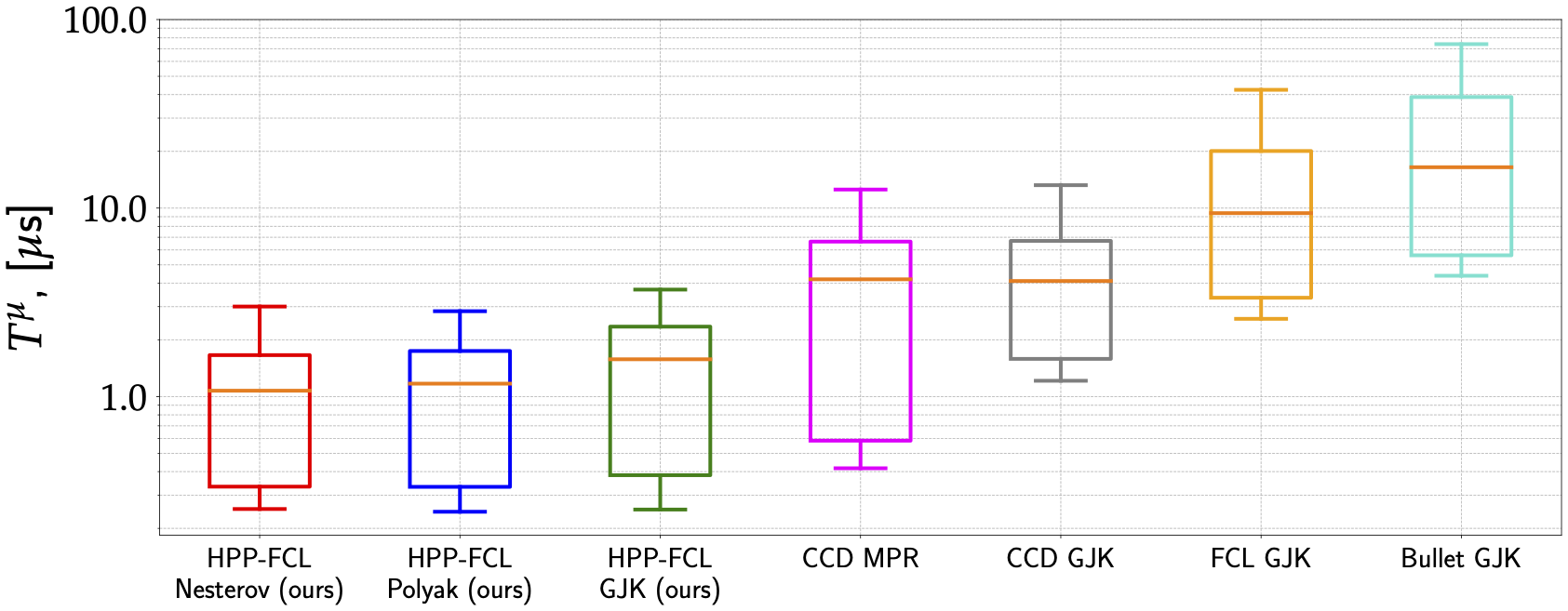
On the one hand, we have benchmarked Coal against major state-of-the-art software alternatives:
- the Bullet simulator,
- the original FCL library (used in the Drake framework),
- the libccd library (used in MuJoCo).
The results are depicted in the following figure, which notably shows that the accelerated variants of GJK largely outperform by a large margin (from 5x up to 15x times faster). Please notice that the y-axis is in log scale.
On the other hand, why do we care about dedicated collision detection solvers like GJK for the narrow phase? Why can’t we simply formulate the collision detection problem as a quadratic problem and call an off-the-shelf optimization solver like ProxQP)? Here is why:
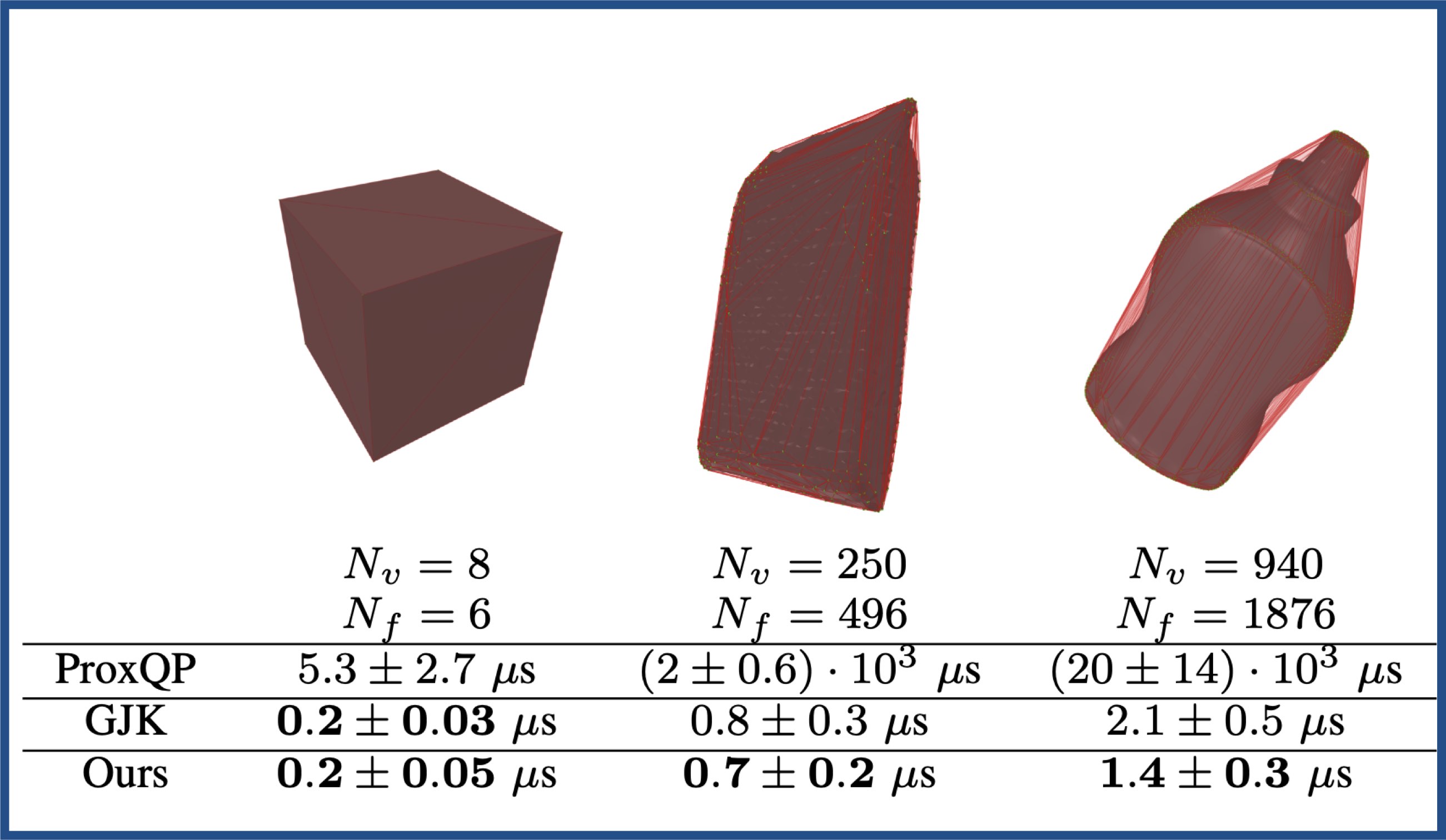
One can observe that GJK-based approaches largely outperform solutions based on classic optimization solvers (e.g., QP solver like ProxQP), notably for large geometries composed of tens or hundreds of vertices.
Open-source projects relying on Coal
- Pinocchio A fast and flexible implementation of Rigid Body Dynamics algorithms and their analytical derivatives.
- IfcOpenShell Open source IFC library and geometry engine.
- Crocoddyl A software to realize model predictive control for complex robotics platforms.
- TSID A software that implements a Task Space Inverse Dynamics QP.
- HPP A SDK that implements motion planners for humanoids and other robots.
- Jiminy A simulator based on Pinocchio.
- ocs2 A toolbox for Optimal Control for Switched Systems (OCS2)
Installation
Conda
Coal can be installed from the conda-forge channel:
conda install coal -c conda-forge
Docker
```
File truncated at 100 lines see the full file
CONTRIBUTING
Contributing Guidelines
Thank you for your interest in contributing to coal.
Whether it’s a bug report, a new feature, a fix, or documentation, we value every contribution.
Read this document before opening an issue or a pull request.
All communication on this project must follow the Code of Conduct.
Table of contents
- Contributing Guidelines
Reporting bugs and feature requests
Use the GitHub issue tracker to report bugs or suggest features.
Before opening an issue, check existing open and closed issues to avoid duplicates.
Use the appropriate template and give as much detail as possible. If you don’t use the template, maintainers may close your issue without explanation.
Asking questions
Ask questions in the discussions section. It separates development topics from community questions. Questions posted in the issue tracker will be moved to the discussions section.
Contributing via pull requests
Choosing an issue
Every external contributor pull request needs an associated issue. Open an issue first. Core developers will review it.
An issue is ready for a pull request when:
- It has the ready label.
- It is not assigned.
- It does not have the core developers label.
Issues with the core developers label are reserved for core developers.
If an issue meets these criteria, claim it with a short comment.
Set up the development environment
The easiest way to set up a development environment is to use pixi, as described in the build documentation.
See the CI workflows for examples with other package managers.
Pull request content
To create a pull request, follow the GitHub guides on forking a repository and creating a pull request.
In your pull request:
- Use a descriptive title and follow the pull request template.
- If the pull request is not ready for review, keep it as a draft.
- Keep it to a single self-contained change. Don’t mix unrelated fixes.
- Keep backward compatibility. Don’t break the API.
- Write tests that cover your changes.
- Add an entry to the changelog.
- Make sure code style checks pass (
pixi run lintorpre-commit run --all-files). - Make sure the CI is green. Ask for help if you’re stuck on a CI issue.
- Check all the appropriate items in the pull request template checklist.
Keeping the pull request up-to-date
You must rebase your work on the upstream devel branch.
git pull --rebase origin devel
Don’t omit the --rebase argument or a merge commit will be created.
Using merge commits to update your pull request is discouraged as it creates
a non-linear git history.
Running tests
File truncated at 100 lines see the full file
Repository Summary
| Checkout URI | https://github.com/humanoid-path-planner/hpp-fcl.git |
| VCS Type | git |
| VCS Version | devel |
| Last Updated | 2026-10-07 |
| Dev Status | DEVELOPED |
| Released | RELEASED |
| Contributing |
Help Wanted (-)
Good First Issues (-) Pull Requests to Review (-) |
Packages
| Name | Version |
|---|---|
| coal | 3.0.4 |
README
Coal — An extension of the Flexible Collision Library
FCL was forked in 2015, creating a new project called HPP-FCL. Since then, a large part of the code has been rewritten or removed (unused and untested code), and new features have been introduced (see below). Due to these major changes, it was decided in 2024 to rename the HPP-FCL project to Coal.
If you use Coal in your projects and research papers, we would appreciate it if you would cite it.
Table of contents
New features
Compared to the original FCL library, the main new features are:
- dedicated and efficient implementations of the GJK and the EPA algorithms (we do not rely on libccd)
- the support of safety margins for collision detection
- an accelerated version of collision detection à la Nesterov, which leads to increased performance (up to a factor of 2). More details are available in this paper
- the computation of a lower bound of the distance between two objects when collision checking is performed, and no collision is found
- the implementation of Python bindings for easy code prototyping
- the support of new geometries such as height fields, capsules, ellipsoids, etc.
- enhance reliability with the fix of a myriad of bugs
- efficient computation of contact points and contact patches between objects
- full support of object serialization via Boost.Serialization
Note: the broad phase was reintroduced by Justin Carpentier in 2022, based on the FCL version 0.7.0.
This project is now used in several robotics frameworks such as Pinocchio, an open-source library which implements efficient and versatile rigid-body dynamics algorithms, the Humanoid Path Planner, an open-source library for Motion and Manipulation Planning. Coal has recently also been used to develop Simple, a new (differentiable) and efficient simulator for robotics and beyond.
A high-performance library
Unlike the original FCL library, Coal implements the well-established GJK algorithm and its variants for collision detection and distance computation. These implementations lead to state-of-the-art performance, as shown in the figures below.
On the one hand, we have benchmarked Coal against major state-of-the-art software alternatives:
- the Bullet simulator,
- the original FCL library (used in the Drake framework),
- the libccd library (used in MuJoCo).
The results are depicted in the following figure, which notably shows that the accelerated variants of GJK largely outperform by a large margin (from 5x up to 15x times faster). Please notice that the y-axis is in log scale.
On the other hand, why do we care about dedicated collision detection solvers like GJK for the narrow phase? Why can’t we simply formulate the collision detection problem as a quadratic problem and call an off-the-shelf optimization solver like ProxQP)? Here is why:
One can observe that GJK-based approaches largely outperform solutions based on classic optimization solvers (e.g., QP solver like ProxQP), notably for large geometries composed of tens or hundreds of vertices.
Open-source projects relying on Coal
- Pinocchio A fast and flexible implementation of Rigid Body Dynamics algorithms and their analytical derivatives.
- IfcOpenShell Open source IFC library and geometry engine.
- Crocoddyl A software to realize model predictive control for complex robotics platforms.
- TSID A software that implements a Task Space Inverse Dynamics QP.
- HPP A SDK that implements motion planners for humanoids and other robots.
- Jiminy A simulator based on Pinocchio.
- ocs2 A toolbox for Optimal Control for Switched Systems (OCS2)
Installation
Conda
Coal can be installed from the conda-forge channel:
conda install coal -c conda-forge
Docker
```
File truncated at 100 lines see the full file
CONTRIBUTING
Contributing Guidelines
Thank you for your interest in contributing to coal.
Whether it’s a bug report, a new feature, a fix, or documentation, we value every contribution.
Read this document before opening an issue or a pull request.
All communication on this project must follow the Code of Conduct.
Table of contents
- Contributing Guidelines
Reporting bugs and feature requests
Use the GitHub issue tracker to report bugs or suggest features.
Before opening an issue, check existing open and closed issues to avoid duplicates.
Use the appropriate template and give as much detail as possible. If you don’t use the template, maintainers may close your issue without explanation.
Asking questions
Ask questions in the discussions section. It separates development topics from community questions. Questions posted in the issue tracker will be moved to the discussions section.
Contributing via pull requests
Choosing an issue
Every external contributor pull request needs an associated issue. Open an issue first. Core developers will review it.
An issue is ready for a pull request when:
- It has the ready label.
- It is not assigned.
- It does not have the core developers label.
Issues with the core developers label are reserved for core developers.
If an issue meets these criteria, claim it with a short comment.
Set up the development environment
The easiest way to set up a development environment is to use pixi, as described in the build documentation.
See the CI workflows for examples with other package managers.
Pull request content
To create a pull request, follow the GitHub guides on forking a repository and creating a pull request.
In your pull request:
- Use a descriptive title and follow the pull request template.
- If the pull request is not ready for review, keep it as a draft.
- Keep it to a single self-contained change. Don’t mix unrelated fixes.
- Keep backward compatibility. Don’t break the API.
- Write tests that cover your changes.
- Add an entry to the changelog.
- Make sure code style checks pass (
pixi run lintorpre-commit run --all-files). - Make sure the CI is green. Ask for help if you’re stuck on a CI issue.
- Check all the appropriate items in the pull request template checklist.
Keeping the pull request up-to-date
You must rebase your work on the upstream devel branch.
git pull --rebase origin devel
Don’t omit the --rebase argument or a merge commit will be created.
Using merge commits to update your pull request is discouraged as it creates
a non-linear git history.
Running tests
File truncated at 100 lines see the full file
Repository Summary
| Checkout URI | https://github.com/humanoid-path-planner/hpp-fcl.git |
| VCS Type | git |
| VCS Version | devel |
| Last Updated | 2026-10-07 |
| Dev Status | DEVELOPED |
| Released | RELEASED |
| Contributing |
Help Wanted (-)
Good First Issues (-) Pull Requests to Review (-) |
Packages
| Name | Version |
|---|---|
| coal | 3.0.4 |
README
Coal — An extension of the Flexible Collision Library
FCL was forked in 2015, creating a new project called HPP-FCL. Since then, a large part of the code has been rewritten or removed (unused and untested code), and new features have been introduced (see below). Due to these major changes, it was decided in 2024 to rename the HPP-FCL project to Coal.
If you use Coal in your projects and research papers, we would appreciate it if you would cite it.
Table of contents
New features
Compared to the original FCL library, the main new features are:
- dedicated and efficient implementations of the GJK and the EPA algorithms (we do not rely on libccd)
- the support of safety margins for collision detection
- an accelerated version of collision detection à la Nesterov, which leads to increased performance (up to a factor of 2). More details are available in this paper
- the computation of a lower bound of the distance between two objects when collision checking is performed, and no collision is found
- the implementation of Python bindings for easy code prototyping
- the support of new geometries such as height fields, capsules, ellipsoids, etc.
- enhance reliability with the fix of a myriad of bugs
- efficient computation of contact points and contact patches between objects
- full support of object serialization via Boost.Serialization
Note: the broad phase was reintroduced by Justin Carpentier in 2022, based on the FCL version 0.7.0.
This project is now used in several robotics frameworks such as Pinocchio, an open-source library which implements efficient and versatile rigid-body dynamics algorithms, the Humanoid Path Planner, an open-source library for Motion and Manipulation Planning. Coal has recently also been used to develop Simple, a new (differentiable) and efficient simulator for robotics and beyond.
A high-performance library
Unlike the original FCL library, Coal implements the well-established GJK algorithm and its variants for collision detection and distance computation. These implementations lead to state-of-the-art performance, as shown in the figures below.
On the one hand, we have benchmarked Coal against major state-of-the-art software alternatives:
- the Bullet simulator,
- the original FCL library (used in the Drake framework),
- the libccd library (used in MuJoCo).
The results are depicted in the following figure, which notably shows that the accelerated variants of GJK largely outperform by a large margin (from 5x up to 15x times faster). Please notice that the y-axis is in log scale.
On the other hand, why do we care about dedicated collision detection solvers like GJK for the narrow phase? Why can’t we simply formulate the collision detection problem as a quadratic problem and call an off-the-shelf optimization solver like ProxQP)? Here is why:
One can observe that GJK-based approaches largely outperform solutions based on classic optimization solvers (e.g., QP solver like ProxQP), notably for large geometries composed of tens or hundreds of vertices.
Open-source projects relying on Coal
- Pinocchio A fast and flexible implementation of Rigid Body Dynamics algorithms and their analytical derivatives.
- IfcOpenShell Open source IFC library and geometry engine.
- Crocoddyl A software to realize model predictive control for complex robotics platforms.
- TSID A software that implements a Task Space Inverse Dynamics QP.
- HPP A SDK that implements motion planners for humanoids and other robots.
- Jiminy A simulator based on Pinocchio.
- ocs2 A toolbox for Optimal Control for Switched Systems (OCS2)
Installation
Conda
Coal can be installed from the conda-forge channel:
conda install coal -c conda-forge
Docker
```
File truncated at 100 lines see the full file
CONTRIBUTING
Contributing Guidelines
Thank you for your interest in contributing to coal.
Whether it’s a bug report, a new feature, a fix, or documentation, we value every contribution.
Read this document before opening an issue or a pull request.
All communication on this project must follow the Code of Conduct.
Table of contents
- Contributing Guidelines
Reporting bugs and feature requests
Use the GitHub issue tracker to report bugs or suggest features.
Before opening an issue, check existing open and closed issues to avoid duplicates.
Use the appropriate template and give as much detail as possible. If you don’t use the template, maintainers may close your issue without explanation.
Asking questions
Ask questions in the discussions section. It separates development topics from community questions. Questions posted in the issue tracker will be moved to the discussions section.
Contributing via pull requests
Choosing an issue
Every external contributor pull request needs an associated issue. Open an issue first. Core developers will review it.
An issue is ready for a pull request when:
- It has the ready label.
- It is not assigned.
- It does not have the core developers label.
Issues with the core developers label are reserved for core developers.
If an issue meets these criteria, claim it with a short comment.
Set up the development environment
The easiest way to set up a development environment is to use pixi, as described in the build documentation.
See the CI workflows for examples with other package managers.
Pull request content
To create a pull request, follow the GitHub guides on forking a repository and creating a pull request.
In your pull request:
- Use a descriptive title and follow the pull request template.
- If the pull request is not ready for review, keep it as a draft.
- Keep it to a single self-contained change. Don’t mix unrelated fixes.
- Keep backward compatibility. Don’t break the API.
- Write tests that cover your changes.
- Add an entry to the changelog.
- Make sure code style checks pass (
pixi run lintorpre-commit run --all-files). - Make sure the CI is green. Ask for help if you’re stuck on a CI issue.
- Check all the appropriate items in the pull request template checklist.
Keeping the pull request up-to-date
You must rebase your work on the upstream devel branch.
git pull --rebase origin devel
Don’t omit the --rebase argument or a merge commit will be created.
Using merge commits to update your pull request is discouraged as it creates
a non-linear git history.
Running tests
File truncated at 100 lines see the full file
Repository Summary
| Checkout URI | https://github.com/humanoid-path-planner/hpp-fcl.git |
| VCS Type | git |
| VCS Version | devel |
| Last Updated | 2026-10-07 |
| Dev Status | DEVELOPED |
| Released | RELEASED |
| Contributing |
Help Wanted (-)
Good First Issues (-) Pull Requests to Review (-) |
Packages
| Name | Version |
|---|---|
| coal | 3.0.4 |
README
Coal — An extension of the Flexible Collision Library
FCL was forked in 2015, creating a new project called HPP-FCL. Since then, a large part of the code has been rewritten or removed (unused and untested code), and new features have been introduced (see below). Due to these major changes, it was decided in 2024 to rename the HPP-FCL project to Coal.
If you use Coal in your projects and research papers, we would appreciate it if you would cite it.
Table of contents
New features
Compared to the original FCL library, the main new features are:
- dedicated and efficient implementations of the GJK and the EPA algorithms (we do not rely on libccd)
- the support of safety margins for collision detection
- an accelerated version of collision detection à la Nesterov, which leads to increased performance (up to a factor of 2). More details are available in this paper
- the computation of a lower bound of the distance between two objects when collision checking is performed, and no collision is found
- the implementation of Python bindings for easy code prototyping
- the support of new geometries such as height fields, capsules, ellipsoids, etc.
- enhance reliability with the fix of a myriad of bugs
- efficient computation of contact points and contact patches between objects
- full support of object serialization via Boost.Serialization
Note: the broad phase was reintroduced by Justin Carpentier in 2022, based on the FCL version 0.7.0.
This project is now used in several robotics frameworks such as Pinocchio, an open-source library which implements efficient and versatile rigid-body dynamics algorithms, the Humanoid Path Planner, an open-source library for Motion and Manipulation Planning. Coal has recently also been used to develop Simple, a new (differentiable) and efficient simulator for robotics and beyond.
A high-performance library
Unlike the original FCL library, Coal implements the well-established GJK algorithm and its variants for collision detection and distance computation. These implementations lead to state-of-the-art performance, as shown in the figures below.
On the one hand, we have benchmarked Coal against major state-of-the-art software alternatives:
- the Bullet simulator,
- the original FCL library (used in the Drake framework),
- the libccd library (used in MuJoCo).
The results are depicted in the following figure, which notably shows that the accelerated variants of GJK largely outperform by a large margin (from 5x up to 15x times faster). Please notice that the y-axis is in log scale.
On the other hand, why do we care about dedicated collision detection solvers like GJK for the narrow phase? Why can’t we simply formulate the collision detection problem as a quadratic problem and call an off-the-shelf optimization solver like ProxQP)? Here is why:
One can observe that GJK-based approaches largely outperform solutions based on classic optimization solvers (e.g., QP solver like ProxQP), notably for large geometries composed of tens or hundreds of vertices.
Open-source projects relying on Coal
- Pinocchio A fast and flexible implementation of Rigid Body Dynamics algorithms and their analytical derivatives.
- IfcOpenShell Open source IFC library and geometry engine.
- Crocoddyl A software to realize model predictive control for complex robotics platforms.
- TSID A software that implements a Task Space Inverse Dynamics QP.
- HPP A SDK that implements motion planners for humanoids and other robots.
- Jiminy A simulator based on Pinocchio.
- ocs2 A toolbox for Optimal Control for Switched Systems (OCS2)
Installation
Conda
Coal can be installed from the conda-forge channel:
conda install coal -c conda-forge
Docker
```
File truncated at 100 lines see the full file
CONTRIBUTING
Contributing Guidelines
Thank you for your interest in contributing to coal.
Whether it’s a bug report, a new feature, a fix, or documentation, we value every contribution.
Read this document before opening an issue or a pull request.
All communication on this project must follow the Code of Conduct.
Table of contents
- Contributing Guidelines
Reporting bugs and feature requests
Use the GitHub issue tracker to report bugs or suggest features.
Before opening an issue, check existing open and closed issues to avoid duplicates.
Use the appropriate template and give as much detail as possible. If you don’t use the template, maintainers may close your issue without explanation.
Asking questions
Ask questions in the discussions section. It separates development topics from community questions. Questions posted in the issue tracker will be moved to the discussions section.
Contributing via pull requests
Choosing an issue
Every external contributor pull request needs an associated issue. Open an issue first. Core developers will review it.
An issue is ready for a pull request when:
- It has the ready label.
- It is not assigned.
- It does not have the core developers label.
Issues with the core developers label are reserved for core developers.
If an issue meets these criteria, claim it with a short comment.
Set up the development environment
The easiest way to set up a development environment is to use pixi, as described in the build documentation.
See the CI workflows for examples with other package managers.
Pull request content
To create a pull request, follow the GitHub guides on forking a repository and creating a pull request.
In your pull request:
- Use a descriptive title and follow the pull request template.
- If the pull request is not ready for review, keep it as a draft.
- Keep it to a single self-contained change. Don’t mix unrelated fixes.
- Keep backward compatibility. Don’t break the API.
- Write tests that cover your changes.
- Add an entry to the changelog.
- Make sure code style checks pass (
pixi run lintorpre-commit run --all-files). - Make sure the CI is green. Ask for help if you’re stuck on a CI issue.
- Check all the appropriate items in the pull request template checklist.
Keeping the pull request up-to-date
You must rebase your work on the upstream devel branch.
git pull --rebase origin devel
Don’t omit the --rebase argument or a merge commit will be created.
Using merge commits to update your pull request is discouraged as it creates
a non-linear git history.
Running tests
File truncated at 100 lines see the full file
Repository Summary
| Checkout URI | https://github.com/humanoid-path-planner/hpp-fcl.git |
| VCS Type | git |
| VCS Version | devel |
| Last Updated | 2026-10-07 |
| Dev Status | DEVELOPED |
| Released | RELEASED |
| Contributing |
Help Wanted (-)
Good First Issues (-) Pull Requests to Review (-) |
Packages
| Name | Version |
|---|---|
| coal | 3.0.4 |
README
Coal — An extension of the Flexible Collision Library
FCL was forked in 2015, creating a new project called HPP-FCL. Since then, a large part of the code has been rewritten or removed (unused and untested code), and new features have been introduced (see below). Due to these major changes, it was decided in 2024 to rename the HPP-FCL project to Coal.
If you use Coal in your projects and research papers, we would appreciate it if you would cite it.
Table of contents
New features
Compared to the original FCL library, the main new features are:
- dedicated and efficient implementations of the GJK and the EPA algorithms (we do not rely on libccd)
- the support of safety margins for collision detection
- an accelerated version of collision detection à la Nesterov, which leads to increased performance (up to a factor of 2). More details are available in this paper
- the computation of a lower bound of the distance between two objects when collision checking is performed, and no collision is found
- the implementation of Python bindings for easy code prototyping
- the support of new geometries such as height fields, capsules, ellipsoids, etc.
- enhance reliability with the fix of a myriad of bugs
- efficient computation of contact points and contact patches between objects
- full support of object serialization via Boost.Serialization
Note: the broad phase was reintroduced by Justin Carpentier in 2022, based on the FCL version 0.7.0.
This project is now used in several robotics frameworks such as Pinocchio, an open-source library which implements efficient and versatile rigid-body dynamics algorithms, the Humanoid Path Planner, an open-source library for Motion and Manipulation Planning. Coal has recently also been used to develop Simple, a new (differentiable) and efficient simulator for robotics and beyond.
A high-performance library
Unlike the original FCL library, Coal implements the well-established GJK algorithm and its variants for collision detection and distance computation. These implementations lead to state-of-the-art performance, as shown in the figures below.
On the one hand, we have benchmarked Coal against major state-of-the-art software alternatives:
- the Bullet simulator,
- the original FCL library (used in the Drake framework),
- the libccd library (used in MuJoCo).
The results are depicted in the following figure, which notably shows that the accelerated variants of GJK largely outperform by a large margin (from 5x up to 15x times faster). Please notice that the y-axis is in log scale.
On the other hand, why do we care about dedicated collision detection solvers like GJK for the narrow phase? Why can’t we simply formulate the collision detection problem as a quadratic problem and call an off-the-shelf optimization solver like ProxQP)? Here is why:
One can observe that GJK-based approaches largely outperform solutions based on classic optimization solvers (e.g., QP solver like ProxQP), notably for large geometries composed of tens or hundreds of vertices.
Open-source projects relying on Coal
- Pinocchio A fast and flexible implementation of Rigid Body Dynamics algorithms and their analytical derivatives.
- IfcOpenShell Open source IFC library and geometry engine.
- Crocoddyl A software to realize model predictive control for complex robotics platforms.
- TSID A software that implements a Task Space Inverse Dynamics QP.
- HPP A SDK that implements motion planners for humanoids and other robots.
- Jiminy A simulator based on Pinocchio.
- ocs2 A toolbox for Optimal Control for Switched Systems (OCS2)
Installation
Conda
Coal can be installed from the conda-forge channel:
conda install coal -c conda-forge
Docker
```
File truncated at 100 lines see the full file
CONTRIBUTING
Contributing Guidelines
Thank you for your interest in contributing to coal.
Whether it’s a bug report, a new feature, a fix, or documentation, we value every contribution.
Read this document before opening an issue or a pull request.
All communication on this project must follow the Code of Conduct.
Table of contents
- Contributing Guidelines
Reporting bugs and feature requests
Use the GitHub issue tracker to report bugs or suggest features.
Before opening an issue, check existing open and closed issues to avoid duplicates.
Use the appropriate template and give as much detail as possible. If you don’t use the template, maintainers may close your issue without explanation.
Asking questions
Ask questions in the discussions section. It separates development topics from community questions. Questions posted in the issue tracker will be moved to the discussions section.
Contributing via pull requests
Choosing an issue
Every external contributor pull request needs an associated issue. Open an issue first. Core developers will review it.
An issue is ready for a pull request when:
- It has the ready label.
- It is not assigned.
- It does not have the core developers label.
Issues with the core developers label are reserved for core developers.
If an issue meets these criteria, claim it with a short comment.
Set up the development environment
The easiest way to set up a development environment is to use pixi, as described in the build documentation.
See the CI workflows for examples with other package managers.
Pull request content
To create a pull request, follow the GitHub guides on forking a repository and creating a pull request.
In your pull request:
- Use a descriptive title and follow the pull request template.
- If the pull request is not ready for review, keep it as a draft.
- Keep it to a single self-contained change. Don’t mix unrelated fixes.
- Keep backward compatibility. Don’t break the API.
- Write tests that cover your changes.
- Add an entry to the changelog.
- Make sure code style checks pass (
pixi run lintorpre-commit run --all-files). - Make sure the CI is green. Ask for help if you’re stuck on a CI issue.
- Check all the appropriate items in the pull request template checklist.
Keeping the pull request up-to-date
You must rebase your work on the upstream devel branch.
git pull --rebase origin devel
Don’t omit the --rebase argument or a merge commit will be created.
Using merge commits to update your pull request is discouraged as it creates
a non-linear git history.
Running tests
File truncated at 100 lines see the full file
Repository Summary
| Checkout URI | https://github.com/humanoid-path-planner/hpp-fcl.git |
| VCS Type | git |
| VCS Version | devel |
| Last Updated | 2026-10-07 |
| Dev Status | DEVELOPED |
| Released | RELEASED |
| Contributing |
Help Wanted (-)
Good First Issues (-) Pull Requests to Review (-) |
Packages
| Name | Version |
|---|---|
| coal | 3.0.4 |
README
Coal — An extension of the Flexible Collision Library
FCL was forked in 2015, creating a new project called HPP-FCL. Since then, a large part of the code has been rewritten or removed (unused and untested code), and new features have been introduced (see below). Due to these major changes, it was decided in 2024 to rename the HPP-FCL project to Coal.
If you use Coal in your projects and research papers, we would appreciate it if you would cite it.
Table of contents
New features
Compared to the original FCL library, the main new features are:
- dedicated and efficient implementations of the GJK and the EPA algorithms (we do not rely on libccd)
- the support of safety margins for collision detection
- an accelerated version of collision detection à la Nesterov, which leads to increased performance (up to a factor of 2). More details are available in this paper
- the computation of a lower bound of the distance between two objects when collision checking is performed, and no collision is found
- the implementation of Python bindings for easy code prototyping
- the support of new geometries such as height fields, capsules, ellipsoids, etc.
- enhance reliability with the fix of a myriad of bugs
- efficient computation of contact points and contact patches between objects
- full support of object serialization via Boost.Serialization
Note: the broad phase was reintroduced by Justin Carpentier in 2022, based on the FCL version 0.7.0.
This project is now used in several robotics frameworks such as Pinocchio, an open-source library which implements efficient and versatile rigid-body dynamics algorithms, the Humanoid Path Planner, an open-source library for Motion and Manipulation Planning. Coal has recently also been used to develop Simple, a new (differentiable) and efficient simulator for robotics and beyond.
A high-performance library
Unlike the original FCL library, Coal implements the well-established GJK algorithm and its variants for collision detection and distance computation. These implementations lead to state-of-the-art performance, as shown in the figures below.
On the one hand, we have benchmarked Coal against major state-of-the-art software alternatives:
- the Bullet simulator,
- the original FCL library (used in the Drake framework),
- the libccd library (used in MuJoCo).
The results are depicted in the following figure, which notably shows that the accelerated variants of GJK largely outperform by a large margin (from 5x up to 15x times faster). Please notice that the y-axis is in log scale.
On the other hand, why do we care about dedicated collision detection solvers like GJK for the narrow phase? Why can’t we simply formulate the collision detection problem as a quadratic problem and call an off-the-shelf optimization solver like ProxQP)? Here is why:
One can observe that GJK-based approaches largely outperform solutions based on classic optimization solvers (e.g., QP solver like ProxQP), notably for large geometries composed of tens or hundreds of vertices.
Open-source projects relying on Coal
- Pinocchio A fast and flexible implementation of Rigid Body Dynamics algorithms and their analytical derivatives.
- IfcOpenShell Open source IFC library and geometry engine.
- Crocoddyl A software to realize model predictive control for complex robotics platforms.
- TSID A software that implements a Task Space Inverse Dynamics QP.
- HPP A SDK that implements motion planners for humanoids and other robots.
- Jiminy A simulator based on Pinocchio.
- ocs2 A toolbox for Optimal Control for Switched Systems (OCS2)
Installation
Conda
Coal can be installed from the conda-forge channel:
conda install coal -c conda-forge
Docker
```
File truncated at 100 lines see the full file
CONTRIBUTING
Contributing Guidelines
Thank you for your interest in contributing to coal.
Whether it’s a bug report, a new feature, a fix, or documentation, we value every contribution.
Read this document before opening an issue or a pull request.
All communication on this project must follow the Code of Conduct.
Table of contents
- Contributing Guidelines
Reporting bugs and feature requests
Use the GitHub issue tracker to report bugs or suggest features.
Before opening an issue, check existing open and closed issues to avoid duplicates.
Use the appropriate template and give as much detail as possible. If you don’t use the template, maintainers may close your issue without explanation.
Asking questions
Ask questions in the discussions section. It separates development topics from community questions. Questions posted in the issue tracker will be moved to the discussions section.
Contributing via pull requests
Choosing an issue
Every external contributor pull request needs an associated issue. Open an issue first. Core developers will review it.
An issue is ready for a pull request when:
- It has the ready label.
- It is not assigned.
- It does not have the core developers label.
Issues with the core developers label are reserved for core developers.
If an issue meets these criteria, claim it with a short comment.
Set up the development environment
The easiest way to set up a development environment is to use pixi, as described in the build documentation.
See the CI workflows for examples with other package managers.
Pull request content
To create a pull request, follow the GitHub guides on forking a repository and creating a pull request.
In your pull request:
- Use a descriptive title and follow the pull request template.
- If the pull request is not ready for review, keep it as a draft.
- Keep it to a single self-contained change. Don’t mix unrelated fixes.
- Keep backward compatibility. Don’t break the API.
- Write tests that cover your changes.
- Add an entry to the changelog.
- Make sure code style checks pass (
pixi run lintorpre-commit run --all-files). - Make sure the CI is green. Ask for help if you’re stuck on a CI issue.
- Check all the appropriate items in the pull request template checklist.
Keeping the pull request up-to-date
You must rebase your work on the upstream devel branch.
git pull --rebase origin devel
Don’t omit the --rebase argument or a merge commit will be created.
Using merge commits to update your pull request is discouraged as it creates
a non-linear git history.
Running tests
File truncated at 100 lines see the full file
Repository Summary
| Checkout URI | https://github.com/humanoid-path-planner/hpp-fcl.git |
| VCS Type | git |
| VCS Version | devel |
| Last Updated | 2026-10-07 |
| Dev Status | DEVELOPED |
| Released | RELEASED |
| Contributing |
Help Wanted (-)
Good First Issues (-) Pull Requests to Review (-) |
Packages
| Name | Version |
|---|---|
| coal | 3.0.4 |
README
Coal — An extension of the Flexible Collision Library
FCL was forked in 2015, creating a new project called HPP-FCL. Since then, a large part of the code has been rewritten or removed (unused and untested code), and new features have been introduced (see below). Due to these major changes, it was decided in 2024 to rename the HPP-FCL project to Coal.
If you use Coal in your projects and research papers, we would appreciate it if you would cite it.
Table of contents
New features
Compared to the original FCL library, the main new features are:
- dedicated and efficient implementations of the GJK and the EPA algorithms (we do not rely on libccd)
- the support of safety margins for collision detection
- an accelerated version of collision detection à la Nesterov, which leads to increased performance (up to a factor of 2). More details are available in this paper
- the computation of a lower bound of the distance between two objects when collision checking is performed, and no collision is found
- the implementation of Python bindings for easy code prototyping
- the support of new geometries such as height fields, capsules, ellipsoids, etc.
- enhance reliability with the fix of a myriad of bugs
- efficient computation of contact points and contact patches between objects
- full support of object serialization via Boost.Serialization
Note: the broad phase was reintroduced by Justin Carpentier in 2022, based on the FCL version 0.7.0.
This project is now used in several robotics frameworks such as Pinocchio, an open-source library which implements efficient and versatile rigid-body dynamics algorithms, the Humanoid Path Planner, an open-source library for Motion and Manipulation Planning. Coal has recently also been used to develop Simple, a new (differentiable) and efficient simulator for robotics and beyond.
A high-performance library
Unlike the original FCL library, Coal implements the well-established GJK algorithm and its variants for collision detection and distance computation. These implementations lead to state-of-the-art performance, as shown in the figures below.
On the one hand, we have benchmarked Coal against major state-of-the-art software alternatives:
- the Bullet simulator,
- the original FCL library (used in the Drake framework),
- the libccd library (used in MuJoCo).
The results are depicted in the following figure, which notably shows that the accelerated variants of GJK largely outperform by a large margin (from 5x up to 15x times faster). Please notice that the y-axis is in log scale.
On the other hand, why do we care about dedicated collision detection solvers like GJK for the narrow phase? Why can’t we simply formulate the collision detection problem as a quadratic problem and call an off-the-shelf optimization solver like ProxQP)? Here is why:
One can observe that GJK-based approaches largely outperform solutions based on classic optimization solvers (e.g., QP solver like ProxQP), notably for large geometries composed of tens or hundreds of vertices.
Open-source projects relying on Coal
- Pinocchio A fast and flexible implementation of Rigid Body Dynamics algorithms and their analytical derivatives.
- IfcOpenShell Open source IFC library and geometry engine.
- Crocoddyl A software to realize model predictive control for complex robotics platforms.
- TSID A software that implements a Task Space Inverse Dynamics QP.
- HPP A SDK that implements motion planners for humanoids and other robots.
- Jiminy A simulator based on Pinocchio.
- ocs2 A toolbox for Optimal Control for Switched Systems (OCS2)
Installation
Conda
Coal can be installed from the conda-forge channel:
conda install coal -c conda-forge
Docker
```
File truncated at 100 lines see the full file
CONTRIBUTING
Contributing Guidelines
Thank you for your interest in contributing to coal.
Whether it’s a bug report, a new feature, a fix, or documentation, we value every contribution.
Read this document before opening an issue or a pull request.
All communication on this project must follow the Code of Conduct.
Table of contents
- Contributing Guidelines
Reporting bugs and feature requests
Use the GitHub issue tracker to report bugs or suggest features.
Before opening an issue, check existing open and closed issues to avoid duplicates.
Use the appropriate template and give as much detail as possible. If you don’t use the template, maintainers may close your issue without explanation.
Asking questions
Ask questions in the discussions section. It separates development topics from community questions. Questions posted in the issue tracker will be moved to the discussions section.
Contributing via pull requests
Choosing an issue
Every external contributor pull request needs an associated issue. Open an issue first. Core developers will review it.
An issue is ready for a pull request when:
- It has the ready label.
- It is not assigned.
- It does not have the core developers label.
Issues with the core developers label are reserved for core developers.
If an issue meets these criteria, claim it with a short comment.
Set up the development environment
The easiest way to set up a development environment is to use pixi, as described in the build documentation.
See the CI workflows for examples with other package managers.
Pull request content
To create a pull request, follow the GitHub guides on forking a repository and creating a pull request.
In your pull request:
- Use a descriptive title and follow the pull request template.
- If the pull request is not ready for review, keep it as a draft.
- Keep it to a single self-contained change. Don’t mix unrelated fixes.
- Keep backward compatibility. Don’t break the API.
- Write tests that cover your changes.
- Add an entry to the changelog.
- Make sure code style checks pass (
pixi run lintorpre-commit run --all-files). - Make sure the CI is green. Ask for help if you’re stuck on a CI issue.
- Check all the appropriate items in the pull request template checklist.
Keeping the pull request up-to-date
You must rebase your work on the upstream devel branch.
git pull --rebase origin devel
Don’t omit the --rebase argument or a merge commit will be created.
Using merge commits to update your pull request is discouraged as it creates
a non-linear git history.
Running tests
File truncated at 100 lines see the full file
Repository Summary
| Checkout URI | https://github.com/humanoid-path-planner/hpp-fcl.git |
| VCS Type | git |
| VCS Version | devel |
| Last Updated | 2026-10-07 |
| Dev Status | DEVELOPED |
| Released | RELEASED |
| Contributing |
Help Wanted (-)
Good First Issues (-) Pull Requests to Review (-) |
Packages
| Name | Version |
|---|---|
| coal | 3.0.4 |
README
Coal — An extension of the Flexible Collision Library
FCL was forked in 2015, creating a new project called HPP-FCL. Since then, a large part of the code has been rewritten or removed (unused and untested code), and new features have been introduced (see below). Due to these major changes, it was decided in 2024 to rename the HPP-FCL project to Coal.
If you use Coal in your projects and research papers, we would appreciate it if you would cite it.
Table of contents
New features
Compared to the original FCL library, the main new features are:
- dedicated and efficient implementations of the GJK and the EPA algorithms (we do not rely on libccd)
- the support of safety margins for collision detection
- an accelerated version of collision detection à la Nesterov, which leads to increased performance (up to a factor of 2). More details are available in this paper
- the computation of a lower bound of the distance between two objects when collision checking is performed, and no collision is found
- the implementation of Python bindings for easy code prototyping
- the support of new geometries such as height fields, capsules, ellipsoids, etc.
- enhance reliability with the fix of a myriad of bugs
- efficient computation of contact points and contact patches between objects
- full support of object serialization via Boost.Serialization
Note: the broad phase was reintroduced by Justin Carpentier in 2022, based on the FCL version 0.7.0.
This project is now used in several robotics frameworks such as Pinocchio, an open-source library which implements efficient and versatile rigid-body dynamics algorithms, the Humanoid Path Planner, an open-source library for Motion and Manipulation Planning. Coal has recently also been used to develop Simple, a new (differentiable) and efficient simulator for robotics and beyond.
A high-performance library
Unlike the original FCL library, Coal implements the well-established GJK algorithm and its variants for collision detection and distance computation. These implementations lead to state-of-the-art performance, as shown in the figures below.
On the one hand, we have benchmarked Coal against major state-of-the-art software alternatives:
- the Bullet simulator,
- the original FCL library (used in the Drake framework),
- the libccd library (used in MuJoCo).
The results are depicted in the following figure, which notably shows that the accelerated variants of GJK largely outperform by a large margin (from 5x up to 15x times faster). Please notice that the y-axis is in log scale.
On the other hand, why do we care about dedicated collision detection solvers like GJK for the narrow phase? Why can’t we simply formulate the collision detection problem as a quadratic problem and call an off-the-shelf optimization solver like ProxQP)? Here is why:
One can observe that GJK-based approaches largely outperform solutions based on classic optimization solvers (e.g., QP solver like ProxQP), notably for large geometries composed of tens or hundreds of vertices.
Open-source projects relying on Coal
- Pinocchio A fast and flexible implementation of Rigid Body Dynamics algorithms and their analytical derivatives.
- IfcOpenShell Open source IFC library and geometry engine.
- Crocoddyl A software to realize model predictive control for complex robotics platforms.
- TSID A software that implements a Task Space Inverse Dynamics QP.
- HPP A SDK that implements motion planners for humanoids and other robots.
- Jiminy A simulator based on Pinocchio.
- ocs2 A toolbox for Optimal Control for Switched Systems (OCS2)
Installation
Conda
Coal can be installed from the conda-forge channel:
conda install coal -c conda-forge
Docker
```
File truncated at 100 lines see the full file
CONTRIBUTING
Contributing Guidelines
Thank you for your interest in contributing to coal.
Whether it’s a bug report, a new feature, a fix, or documentation, we value every contribution.
Read this document before opening an issue or a pull request.
All communication on this project must follow the Code of Conduct.
Table of contents
- Contributing Guidelines
Reporting bugs and feature requests
Use the GitHub issue tracker to report bugs or suggest features.
Before opening an issue, check existing open and closed issues to avoid duplicates.
Use the appropriate template and give as much detail as possible. If you don’t use the template, maintainers may close your issue without explanation.
Asking questions
Ask questions in the discussions section. It separates development topics from community questions. Questions posted in the issue tracker will be moved to the discussions section.
Contributing via pull requests
Choosing an issue
Every external contributor pull request needs an associated issue. Open an issue first. Core developers will review it.
An issue is ready for a pull request when:
- It has the ready label.
- It is not assigned.
- It does not have the core developers label.
Issues with the core developers label are reserved for core developers.
If an issue meets these criteria, claim it with a short comment.
Set up the development environment
The easiest way to set up a development environment is to use pixi, as described in the build documentation.
See the CI workflows for examples with other package managers.
Pull request content
To create a pull request, follow the GitHub guides on forking a repository and creating a pull request.
In your pull request:
- Use a descriptive title and follow the pull request template.
- If the pull request is not ready for review, keep it as a draft.
- Keep it to a single self-contained change. Don’t mix unrelated fixes.
- Keep backward compatibility. Don’t break the API.
- Write tests that cover your changes.
- Add an entry to the changelog.
- Make sure code style checks pass (
pixi run lintorpre-commit run --all-files). - Make sure the CI is green. Ask for help if you’re stuck on a CI issue.
- Check all the appropriate items in the pull request template checklist.
Keeping the pull request up-to-date
You must rebase your work on the upstream devel branch.
git pull --rebase origin devel
Don’t omit the --rebase argument or a merge commit will be created.
Using merge commits to update your pull request is discouraged as it creates
a non-linear git history.
Running tests
File truncated at 100 lines see the full file
Repository Summary
| Checkout URI | https://github.com/humanoid-path-planner/hpp-fcl.git |
| VCS Type | git |
| VCS Version | devel |
| Last Updated | 2026-10-07 |
| Dev Status | DEVELOPED |
| Released | RELEASED |
| Contributing |
Help Wanted (-)
Good First Issues (-) Pull Requests to Review (-) |
Packages
| Name | Version |
|---|---|
| coal | 3.0.4 |
README
Coal — An extension of the Flexible Collision Library
FCL was forked in 2015, creating a new project called HPP-FCL. Since then, a large part of the code has been rewritten or removed (unused and untested code), and new features have been introduced (see below). Due to these major changes, it was decided in 2024 to rename the HPP-FCL project to Coal.
If you use Coal in your projects and research papers, we would appreciate it if you would cite it.
Table of contents
New features
Compared to the original FCL library, the main new features are:
- dedicated and efficient implementations of the GJK and the EPA algorithms (we do not rely on libccd)
- the support of safety margins for collision detection
- an accelerated version of collision detection à la Nesterov, which leads to increased performance (up to a factor of 2). More details are available in this paper
- the computation of a lower bound of the distance between two objects when collision checking is performed, and no collision is found
- the implementation of Python bindings for easy code prototyping
- the support of new geometries such as height fields, capsules, ellipsoids, etc.
- enhance reliability with the fix of a myriad of bugs
- efficient computation of contact points and contact patches between objects
- full support of object serialization via Boost.Serialization
Note: the broad phase was reintroduced by Justin Carpentier in 2022, based on the FCL version 0.7.0.
This project is now used in several robotics frameworks such as Pinocchio, an open-source library which implements efficient and versatile rigid-body dynamics algorithms, the Humanoid Path Planner, an open-source library for Motion and Manipulation Planning. Coal has recently also been used to develop Simple, a new (differentiable) and efficient simulator for robotics and beyond.
A high-performance library
Unlike the original FCL library, Coal implements the well-established GJK algorithm and its variants for collision detection and distance computation. These implementations lead to state-of-the-art performance, as shown in the figures below.
On the one hand, we have benchmarked Coal against major state-of-the-art software alternatives:
- the Bullet simulator,
- the original FCL library (used in the Drake framework),
- the libccd library (used in MuJoCo).
The results are depicted in the following figure, which notably shows that the accelerated variants of GJK largely outperform by a large margin (from 5x up to 15x times faster). Please notice that the y-axis is in log scale.
On the other hand, why do we care about dedicated collision detection solvers like GJK for the narrow phase? Why can’t we simply formulate the collision detection problem as a quadratic problem and call an off-the-shelf optimization solver like ProxQP)? Here is why:
One can observe that GJK-based approaches largely outperform solutions based on classic optimization solvers (e.g., QP solver like ProxQP), notably for large geometries composed of tens or hundreds of vertices.
Open-source projects relying on Coal
- Pinocchio A fast and flexible implementation of Rigid Body Dynamics algorithms and their analytical derivatives.
- IfcOpenShell Open source IFC library and geometry engine.
- Crocoddyl A software to realize model predictive control for complex robotics platforms.
- TSID A software that implements a Task Space Inverse Dynamics QP.
- HPP A SDK that implements motion planners for humanoids and other robots.
- Jiminy A simulator based on Pinocchio.
- ocs2 A toolbox for Optimal Control for Switched Systems (OCS2)
Installation
Conda
Coal can be installed from the conda-forge channel:
conda install coal -c conda-forge
Docker
```
File truncated at 100 lines see the full file
CONTRIBUTING
Contributing Guidelines
Thank you for your interest in contributing to coal.
Whether it’s a bug report, a new feature, a fix, or documentation, we value every contribution.
Read this document before opening an issue or a pull request.
All communication on this project must follow the Code of Conduct.
Table of contents
- Contributing Guidelines
Reporting bugs and feature requests
Use the GitHub issue tracker to report bugs or suggest features.
Before opening an issue, check existing open and closed issues to avoid duplicates.
Use the appropriate template and give as much detail as possible. If you don’t use the template, maintainers may close your issue without explanation.
Asking questions
Ask questions in the discussions section. It separates development topics from community questions. Questions posted in the issue tracker will be moved to the discussions section.
Contributing via pull requests
Choosing an issue
Every external contributor pull request needs an associated issue. Open an issue first. Core developers will review it.
An issue is ready for a pull request when:
- It has the ready label.
- It is not assigned.
- It does not have the core developers label.
Issues with the core developers label are reserved for core developers.
If an issue meets these criteria, claim it with a short comment.
Set up the development environment
The easiest way to set up a development environment is to use pixi, as described in the build documentation.
See the CI workflows for examples with other package managers.
Pull request content
To create a pull request, follow the GitHub guides on forking a repository and creating a pull request.
In your pull request:
- Use a descriptive title and follow the pull request template.
- If the pull request is not ready for review, keep it as a draft.
- Keep it to a single self-contained change. Don’t mix unrelated fixes.
- Keep backward compatibility. Don’t break the API.
- Write tests that cover your changes.
- Add an entry to the changelog.
- Make sure code style checks pass (
pixi run lintorpre-commit run --all-files). - Make sure the CI is green. Ask for help if you’re stuck on a CI issue.
- Check all the appropriate items in the pull request template checklist.
Keeping the pull request up-to-date
You must rebase your work on the upstream devel branch.
git pull --rebase origin devel
Don’t omit the --rebase argument or a merge commit will be created.
Using merge commits to update your pull request is discouraged as it creates
a non-linear git history.
Running tests
File truncated at 100 lines see the full file
Repository Summary
| Checkout URI | https://github.com/humanoid-path-planner/hpp-fcl.git |
| VCS Type | git |
| VCS Version | devel |
| Last Updated | 2026-10-07 |
| Dev Status | DEVELOPED |
| Released | RELEASED |
| Contributing |
Help Wanted (-)
Good First Issues (-) Pull Requests to Review (-) |
Packages
| Name | Version |
|---|---|
| coal | 3.0.4 |
README
Coal — An extension of the Flexible Collision Library
FCL was forked in 2015, creating a new project called HPP-FCL. Since then, a large part of the code has been rewritten or removed (unused and untested code), and new features have been introduced (see below). Due to these major changes, it was decided in 2024 to rename the HPP-FCL project to Coal.
If you use Coal in your projects and research papers, we would appreciate it if you would cite it.
Table of contents
New features
Compared to the original FCL library, the main new features are:
- dedicated and efficient implementations of the GJK and the EPA algorithms (we do not rely on libccd)
- the support of safety margins for collision detection
- an accelerated version of collision detection à la Nesterov, which leads to increased performance (up to a factor of 2). More details are available in this paper
- the computation of a lower bound of the distance between two objects when collision checking is performed, and no collision is found
- the implementation of Python bindings for easy code prototyping
- the support of new geometries such as height fields, capsules, ellipsoids, etc.
- enhance reliability with the fix of a myriad of bugs
- efficient computation of contact points and contact patches between objects
- full support of object serialization via Boost.Serialization
Note: the broad phase was reintroduced by Justin Carpentier in 2022, based on the FCL version 0.7.0.
This project is now used in several robotics frameworks such as Pinocchio, an open-source library which implements efficient and versatile rigid-body dynamics algorithms, the Humanoid Path Planner, an open-source library for Motion and Manipulation Planning. Coal has recently also been used to develop Simple, a new (differentiable) and efficient simulator for robotics and beyond.
A high-performance library
Unlike the original FCL library, Coal implements the well-established GJK algorithm and its variants for collision detection and distance computation. These implementations lead to state-of-the-art performance, as shown in the figures below.
On the one hand, we have benchmarked Coal against major state-of-the-art software alternatives:
- the Bullet simulator,
- the original FCL library (used in the Drake framework),
- the libccd library (used in MuJoCo).
The results are depicted in the following figure, which notably shows that the accelerated variants of GJK largely outperform by a large margin (from 5x up to 15x times faster). Please notice that the y-axis is in log scale.
On the other hand, why do we care about dedicated collision detection solvers like GJK for the narrow phase? Why can’t we simply formulate the collision detection problem as a quadratic problem and call an off-the-shelf optimization solver like ProxQP)? Here is why:
One can observe that GJK-based approaches largely outperform solutions based on classic optimization solvers (e.g., QP solver like ProxQP), notably for large geometries composed of tens or hundreds of vertices.
Open-source projects relying on Coal
- Pinocchio A fast and flexible implementation of Rigid Body Dynamics algorithms and their analytical derivatives.
- IfcOpenShell Open source IFC library and geometry engine.
- Crocoddyl A software to realize model predictive control for complex robotics platforms.
- TSID A software that implements a Task Space Inverse Dynamics QP.
- HPP A SDK that implements motion planners for humanoids and other robots.
- Jiminy A simulator based on Pinocchio.
- ocs2 A toolbox for Optimal Control for Switched Systems (OCS2)
Installation
Conda
Coal can be installed from the conda-forge channel:
conda install coal -c conda-forge
Docker
```
File truncated at 100 lines see the full file
CONTRIBUTING
Contributing Guidelines
Thank you for your interest in contributing to coal.
Whether it’s a bug report, a new feature, a fix, or documentation, we value every contribution.
Read this document before opening an issue or a pull request.
All communication on this project must follow the Code of Conduct.
Table of contents
- Contributing Guidelines
Reporting bugs and feature requests
Use the GitHub issue tracker to report bugs or suggest features.
Before opening an issue, check existing open and closed issues to avoid duplicates.
Use the appropriate template and give as much detail as possible. If you don’t use the template, maintainers may close your issue without explanation.
Asking questions
Ask questions in the discussions section. It separates development topics from community questions. Questions posted in the issue tracker will be moved to the discussions section.
Contributing via pull requests
Choosing an issue
Every external contributor pull request needs an associated issue. Open an issue first. Core developers will review it.
An issue is ready for a pull request when:
- It has the ready label.
- It is not assigned.
- It does not have the core developers label.
Issues with the core developers label are reserved for core developers.
If an issue meets these criteria, claim it with a short comment.
Set up the development environment
The easiest way to set up a development environment is to use pixi, as described in the build documentation.
See the CI workflows for examples with other package managers.
Pull request content
To create a pull request, follow the GitHub guides on forking a repository and creating a pull request.
In your pull request:
- Use a descriptive title and follow the pull request template.
- If the pull request is not ready for review, keep it as a draft.
- Keep it to a single self-contained change. Don’t mix unrelated fixes.
- Keep backward compatibility. Don’t break the API.
- Write tests that cover your changes.
- Add an entry to the changelog.
- Make sure code style checks pass (
pixi run lintorpre-commit run --all-files). - Make sure the CI is green. Ask for help if you’re stuck on a CI issue.
- Check all the appropriate items in the pull request template checklist.
Keeping the pull request up-to-date
You must rebase your work on the upstream devel branch.
git pull --rebase origin devel
Don’t omit the --rebase argument or a merge commit will be created.
Using merge commits to update your pull request is discouraged as it creates
a non-linear git history.
Running tests
File truncated at 100 lines see the full file
Repository Summary
| Checkout URI | https://github.com/humanoid-path-planner/hpp-fcl.git |
| VCS Type | git |
| VCS Version | devel |
| Last Updated | 2026-10-07 |
| Dev Status | DEVELOPED |
| Released | RELEASED |
| Contributing |
Help Wanted (-)
Good First Issues (-) Pull Requests to Review (-) |
Packages
| Name | Version |
|---|---|
| coal | 3.0.4 |
README
Coal — An extension of the Flexible Collision Library
FCL was forked in 2015, creating a new project called HPP-FCL. Since then, a large part of the code has been rewritten or removed (unused and untested code), and new features have been introduced (see below). Due to these major changes, it was decided in 2024 to rename the HPP-FCL project to Coal.
If you use Coal in your projects and research papers, we would appreciate it if you would cite it.
Table of contents
New features
Compared to the original FCL library, the main new features are:
- dedicated and efficient implementations of the GJK and the EPA algorithms (we do not rely on libccd)
- the support of safety margins for collision detection
- an accelerated version of collision detection à la Nesterov, which leads to increased performance (up to a factor of 2). More details are available in this paper
- the computation of a lower bound of the distance between two objects when collision checking is performed, and no collision is found
- the implementation of Python bindings for easy code prototyping
- the support of new geometries such as height fields, capsules, ellipsoids, etc.
- enhance reliability with the fix of a myriad of bugs
- efficient computation of contact points and contact patches between objects
- full support of object serialization via Boost.Serialization
Note: the broad phase was reintroduced by Justin Carpentier in 2022, based on the FCL version 0.7.0.
This project is now used in several robotics frameworks such as Pinocchio, an open-source library which implements efficient and versatile rigid-body dynamics algorithms, the Humanoid Path Planner, an open-source library for Motion and Manipulation Planning. Coal has recently also been used to develop Simple, a new (differentiable) and efficient simulator for robotics and beyond.
A high-performance library
Unlike the original FCL library, Coal implements the well-established GJK algorithm and its variants for collision detection and distance computation. These implementations lead to state-of-the-art performance, as shown in the figures below.
On the one hand, we have benchmarked Coal against major state-of-the-art software alternatives:
- the Bullet simulator,
- the original FCL library (used in the Drake framework),
- the libccd library (used in MuJoCo).
The results are depicted in the following figure, which notably shows that the accelerated variants of GJK largely outperform by a large margin (from 5x up to 15x times faster). Please notice that the y-axis is in log scale.
On the other hand, why do we care about dedicated collision detection solvers like GJK for the narrow phase? Why can’t we simply formulate the collision detection problem as a quadratic problem and call an off-the-shelf optimization solver like ProxQP)? Here is why:
One can observe that GJK-based approaches largely outperform solutions based on classic optimization solvers (e.g., QP solver like ProxQP), notably for large geometries composed of tens or hundreds of vertices.
Open-source projects relying on Coal
- Pinocchio A fast and flexible implementation of Rigid Body Dynamics algorithms and their analytical derivatives.
- IfcOpenShell Open source IFC library and geometry engine.
- Crocoddyl A software to realize model predictive control for complex robotics platforms.
- TSID A software that implements a Task Space Inverse Dynamics QP.
- HPP A SDK that implements motion planners for humanoids and other robots.
- Jiminy A simulator based on Pinocchio.
- ocs2 A toolbox for Optimal Control for Switched Systems (OCS2)
Installation
Conda
Coal can be installed from the conda-forge channel:
conda install coal -c conda-forge
Docker
```
File truncated at 100 lines see the full file
CONTRIBUTING
Contributing Guidelines
Thank you for your interest in contributing to coal.
Whether it’s a bug report, a new feature, a fix, or documentation, we value every contribution.
Read this document before opening an issue or a pull request.
All communication on this project must follow the Code of Conduct.
Table of contents
- Contributing Guidelines
Reporting bugs and feature requests
Use the GitHub issue tracker to report bugs or suggest features.
Before opening an issue, check existing open and closed issues to avoid duplicates.
Use the appropriate template and give as much detail as possible. If you don’t use the template, maintainers may close your issue without explanation.
Asking questions
Ask questions in the discussions section. It separates development topics from community questions. Questions posted in the issue tracker will be moved to the discussions section.
Contributing via pull requests
Choosing an issue
Every external contributor pull request needs an associated issue. Open an issue first. Core developers will review it.
An issue is ready for a pull request when:
- It has the ready label.
- It is not assigned.
- It does not have the core developers label.
Issues with the core developers label are reserved for core developers.
If an issue meets these criteria, claim it with a short comment.
Set up the development environment
The easiest way to set up a development environment is to use pixi, as described in the build documentation.
See the CI workflows for examples with other package managers.
Pull request content
To create a pull request, follow the GitHub guides on forking a repository and creating a pull request.
In your pull request:
- Use a descriptive title and follow the pull request template.
- If the pull request is not ready for review, keep it as a draft.
- Keep it to a single self-contained change. Don’t mix unrelated fixes.
- Keep backward compatibility. Don’t break the API.
- Write tests that cover your changes.
- Add an entry to the changelog.
- Make sure code style checks pass (
pixi run lintorpre-commit run --all-files). - Make sure the CI is green. Ask for help if you’re stuck on a CI issue.
- Check all the appropriate items in the pull request template checklist.
Keeping the pull request up-to-date
You must rebase your work on the upstream devel branch.
git pull --rebase origin devel
Don’t omit the --rebase argument or a merge commit will be created.
Using merge commits to update your pull request is discouraged as it creates
a non-linear git history.
Running tests
File truncated at 100 lines see the full file
Repository Summary
| Checkout URI | https://github.com/humanoid-path-planner/hpp-fcl.git |
| VCS Type | git |
| VCS Version | devel |
| Last Updated | 2026-10-07 |
| Dev Status | DEVELOPED |
| Released | RELEASED |
| Contributing |
Help Wanted (-)
Good First Issues (-) Pull Requests to Review (-) |
Packages
| Name | Version |
|---|---|
| coal | 3.0.4 |
README
Coal — An extension of the Flexible Collision Library
FCL was forked in 2015, creating a new project called HPP-FCL. Since then, a large part of the code has been rewritten or removed (unused and untested code), and new features have been introduced (see below). Due to these major changes, it was decided in 2024 to rename the HPP-FCL project to Coal.
If you use Coal in your projects and research papers, we would appreciate it if you would cite it.
Table of contents
New features
Compared to the original FCL library, the main new features are:
- dedicated and efficient implementations of the GJK and the EPA algorithms (we do not rely on libccd)
- the support of safety margins for collision detection
- an accelerated version of collision detection à la Nesterov, which leads to increased performance (up to a factor of 2). More details are available in this paper
- the computation of a lower bound of the distance between two objects when collision checking is performed, and no collision is found
- the implementation of Python bindings for easy code prototyping
- the support of new geometries such as height fields, capsules, ellipsoids, etc.
- enhance reliability with the fix of a myriad of bugs
- efficient computation of contact points and contact patches between objects
- full support of object serialization via Boost.Serialization
Note: the broad phase was reintroduced by Justin Carpentier in 2022, based on the FCL version 0.7.0.
This project is now used in several robotics frameworks such as Pinocchio, an open-source library which implements efficient and versatile rigid-body dynamics algorithms, the Humanoid Path Planner, an open-source library for Motion and Manipulation Planning. Coal has recently also been used to develop Simple, a new (differentiable) and efficient simulator for robotics and beyond.
A high-performance library
Unlike the original FCL library, Coal implements the well-established GJK algorithm and its variants for collision detection and distance computation. These implementations lead to state-of-the-art performance, as shown in the figures below.
On the one hand, we have benchmarked Coal against major state-of-the-art software alternatives:
- the Bullet simulator,
- the original FCL library (used in the Drake framework),
- the libccd library (used in MuJoCo).
The results are depicted in the following figure, which notably shows that the accelerated variants of GJK largely outperform by a large margin (from 5x up to 15x times faster). Please notice that the y-axis is in log scale.
On the other hand, why do we care about dedicated collision detection solvers like GJK for the narrow phase? Why can’t we simply formulate the collision detection problem as a quadratic problem and call an off-the-shelf optimization solver like ProxQP)? Here is why:
One can observe that GJK-based approaches largely outperform solutions based on classic optimization solvers (e.g., QP solver like ProxQP), notably for large geometries composed of tens or hundreds of vertices.
Open-source projects relying on Coal
- Pinocchio A fast and flexible implementation of Rigid Body Dynamics algorithms and their analytical derivatives.
- IfcOpenShell Open source IFC library and geometry engine.
- Crocoddyl A software to realize model predictive control for complex robotics platforms.
- TSID A software that implements a Task Space Inverse Dynamics QP.
- HPP A SDK that implements motion planners for humanoids and other robots.
- Jiminy A simulator based on Pinocchio.
- ocs2 A toolbox for Optimal Control for Switched Systems (OCS2)
Installation
Conda
Coal can be installed from the conda-forge channel:
conda install coal -c conda-forge
Docker
```
File truncated at 100 lines see the full file
CONTRIBUTING
Contributing Guidelines
Thank you for your interest in contributing to coal.
Whether it’s a bug report, a new feature, a fix, or documentation, we value every contribution.
Read this document before opening an issue or a pull request.
All communication on this project must follow the Code of Conduct.
Table of contents
- Contributing Guidelines
Reporting bugs and feature requests
Use the GitHub issue tracker to report bugs or suggest features.
Before opening an issue, check existing open and closed issues to avoid duplicates.
Use the appropriate template and give as much detail as possible. If you don’t use the template, maintainers may close your issue without explanation.
Asking questions
Ask questions in the discussions section. It separates development topics from community questions. Questions posted in the issue tracker will be moved to the discussions section.
Contributing via pull requests
Choosing an issue
Every external contributor pull request needs an associated issue. Open an issue first. Core developers will review it.
An issue is ready for a pull request when:
- It has the ready label.
- It is not assigned.
- It does not have the core developers label.
Issues with the core developers label are reserved for core developers.
If an issue meets these criteria, claim it with a short comment.
Set up the development environment
The easiest way to set up a development environment is to use pixi, as described in the build documentation.
See the CI workflows for examples with other package managers.
Pull request content
To create a pull request, follow the GitHub guides on forking a repository and creating a pull request.
In your pull request:
- Use a descriptive title and follow the pull request template.
- If the pull request is not ready for review, keep it as a draft.
- Keep it to a single self-contained change. Don’t mix unrelated fixes.
- Keep backward compatibility. Don’t break the API.
- Write tests that cover your changes.
- Add an entry to the changelog.
- Make sure code style checks pass (
pixi run lintorpre-commit run --all-files). - Make sure the CI is green. Ask for help if you’re stuck on a CI issue.
- Check all the appropriate items in the pull request template checklist.
Keeping the pull request up-to-date
You must rebase your work on the upstream devel branch.
git pull --rebase origin devel
Don’t omit the --rebase argument or a merge commit will be created.
Using merge commits to update your pull request is discouraged as it creates
a non-linear git history.
Running tests
File truncated at 100 lines see the full file
Repository Summary
| Checkout URI | https://github.com/humanoid-path-planner/hpp-fcl.git |
| VCS Type | git |
| VCS Version | devel |
| Last Updated | 2026-10-07 |
| Dev Status | DEVELOPED |
| Released | RELEASED |
| Contributing |
Help Wanted (-)
Good First Issues (-) Pull Requests to Review (-) |
Packages
| Name | Version |
|---|---|
| coal | 3.0.4 |
README
Coal — An extension of the Flexible Collision Library
FCL was forked in 2015, creating a new project called HPP-FCL. Since then, a large part of the code has been rewritten or removed (unused and untested code), and new features have been introduced (see below). Due to these major changes, it was decided in 2024 to rename the HPP-FCL project to Coal.
If you use Coal in your projects and research papers, we would appreciate it if you would cite it.
Table of contents
New features
Compared to the original FCL library, the main new features are:
- dedicated and efficient implementations of the GJK and the EPA algorithms (we do not rely on libccd)
- the support of safety margins for collision detection
- an accelerated version of collision detection à la Nesterov, which leads to increased performance (up to a factor of 2). More details are available in this paper
- the computation of a lower bound of the distance between two objects when collision checking is performed, and no collision is found
- the implementation of Python bindings for easy code prototyping
- the support of new geometries such as height fields, capsules, ellipsoids, etc.
- enhance reliability with the fix of a myriad of bugs
- efficient computation of contact points and contact patches between objects
- full support of object serialization via Boost.Serialization
Note: the broad phase was reintroduced by Justin Carpentier in 2022, based on the FCL version 0.7.0.
This project is now used in several robotics frameworks such as Pinocchio, an open-source library which implements efficient and versatile rigid-body dynamics algorithms, the Humanoid Path Planner, an open-source library for Motion and Manipulation Planning. Coal has recently also been used to develop Simple, a new (differentiable) and efficient simulator for robotics and beyond.
A high-performance library
Unlike the original FCL library, Coal implements the well-established GJK algorithm and its variants for collision detection and distance computation. These implementations lead to state-of-the-art performance, as shown in the figures below.
On the one hand, we have benchmarked Coal against major state-of-the-art software alternatives:
- the Bullet simulator,
- the original FCL library (used in the Drake framework),
- the libccd library (used in MuJoCo).
The results are depicted in the following figure, which notably shows that the accelerated variants of GJK largely outperform by a large margin (from 5x up to 15x times faster). Please notice that the y-axis is in log scale.
On the other hand, why do we care about dedicated collision detection solvers like GJK for the narrow phase? Why can’t we simply formulate the collision detection problem as a quadratic problem and call an off-the-shelf optimization solver like ProxQP)? Here is why:
One can observe that GJK-based approaches largely outperform solutions based on classic optimization solvers (e.g., QP solver like ProxQP), notably for large geometries composed of tens or hundreds of vertices.
Open-source projects relying on Coal
- Pinocchio A fast and flexible implementation of Rigid Body Dynamics algorithms and their analytical derivatives.
- IfcOpenShell Open source IFC library and geometry engine.
- Crocoddyl A software to realize model predictive control for complex robotics platforms.
- TSID A software that implements a Task Space Inverse Dynamics QP.
- HPP A SDK that implements motion planners for humanoids and other robots.
- Jiminy A simulator based on Pinocchio.
- ocs2 A toolbox for Optimal Control for Switched Systems (OCS2)
Installation
Conda
Coal can be installed from the conda-forge channel:
conda install coal -c conda-forge
Docker
```
File truncated at 100 lines see the full file
CONTRIBUTING
Contributing Guidelines
Thank you for your interest in contributing to coal.
Whether it’s a bug report, a new feature, a fix, or documentation, we value every contribution.
Read this document before opening an issue or a pull request.
All communication on this project must follow the Code of Conduct.
Table of contents
- Contributing Guidelines
Reporting bugs and feature requests
Use the GitHub issue tracker to report bugs or suggest features.
Before opening an issue, check existing open and closed issues to avoid duplicates.
Use the appropriate template and give as much detail as possible. If you don’t use the template, maintainers may close your issue without explanation.
Asking questions
Ask questions in the discussions section. It separates development topics from community questions. Questions posted in the issue tracker will be moved to the discussions section.
Contributing via pull requests
Choosing an issue
Every external contributor pull request needs an associated issue. Open an issue first. Core developers will review it.
An issue is ready for a pull request when:
- It has the ready label.
- It is not assigned.
- It does not have the core developers label.
Issues with the core developers label are reserved for core developers.
If an issue meets these criteria, claim it with a short comment.
Set up the development environment
The easiest way to set up a development environment is to use pixi, as described in the build documentation.
See the CI workflows for examples with other package managers.
Pull request content
To create a pull request, follow the GitHub guides on forking a repository and creating a pull request.
In your pull request:
- Use a descriptive title and follow the pull request template.
- If the pull request is not ready for review, keep it as a draft.
- Keep it to a single self-contained change. Don’t mix unrelated fixes.
- Keep backward compatibility. Don’t break the API.
- Write tests that cover your changes.
- Add an entry to the changelog.
- Make sure code style checks pass (
pixi run lintorpre-commit run --all-files). - Make sure the CI is green. Ask for help if you’re stuck on a CI issue.
- Check all the appropriate items in the pull request template checklist.
Keeping the pull request up-to-date
You must rebase your work on the upstream devel branch.
git pull --rebase origin devel
Don’t omit the --rebase argument or a merge commit will be created.
Using merge commits to update your pull request is discouraged as it creates
a non-linear git history.
Running tests
File truncated at 100 lines see the full file
Repository Summary
| Checkout URI | https://github.com/humanoid-path-planner/hpp-fcl.git |
| VCS Type | git |
| VCS Version | devel |
| Last Updated | 2026-10-07 |
| Dev Status | DEVELOPED |
| Released | RELEASED |
| Contributing |
Help Wanted (-)
Good First Issues (-) Pull Requests to Review (-) |
Packages
| Name | Version |
|---|---|
| coal | 3.0.4 |
README
Coal — An extension of the Flexible Collision Library
FCL was forked in 2015, creating a new project called HPP-FCL. Since then, a large part of the code has been rewritten or removed (unused and untested code), and new features have been introduced (see below). Due to these major changes, it was decided in 2024 to rename the HPP-FCL project to Coal.
If you use Coal in your projects and research papers, we would appreciate it if you would cite it.
Table of contents
New features
Compared to the original FCL library, the main new features are:
- dedicated and efficient implementations of the GJK and the EPA algorithms (we do not rely on libccd)
- the support of safety margins for collision detection
- an accelerated version of collision detection à la Nesterov, which leads to increased performance (up to a factor of 2). More details are available in this paper
- the computation of a lower bound of the distance between two objects when collision checking is performed, and no collision is found
- the implementation of Python bindings for easy code prototyping
- the support of new geometries such as height fields, capsules, ellipsoids, etc.
- enhance reliability with the fix of a myriad of bugs
- efficient computation of contact points and contact patches between objects
- full support of object serialization via Boost.Serialization
Note: the broad phase was reintroduced by Justin Carpentier in 2022, based on the FCL version 0.7.0.
This project is now used in several robotics frameworks such as Pinocchio, an open-source library which implements efficient and versatile rigid-body dynamics algorithms, the Humanoid Path Planner, an open-source library for Motion and Manipulation Planning. Coal has recently also been used to develop Simple, a new (differentiable) and efficient simulator for robotics and beyond.
A high-performance library
Unlike the original FCL library, Coal implements the well-established GJK algorithm and its variants for collision detection and distance computation. These implementations lead to state-of-the-art performance, as shown in the figures below.
On the one hand, we have benchmarked Coal against major state-of-the-art software alternatives:
- the Bullet simulator,
- the original FCL library (used in the Drake framework),
- the libccd library (used in MuJoCo).
The results are depicted in the following figure, which notably shows that the accelerated variants of GJK largely outperform by a large margin (from 5x up to 15x times faster). Please notice that the y-axis is in log scale.
On the other hand, why do we care about dedicated collision detection solvers like GJK for the narrow phase? Why can’t we simply formulate the collision detection problem as a quadratic problem and call an off-the-shelf optimization solver like ProxQP)? Here is why:
One can observe that GJK-based approaches largely outperform solutions based on classic optimization solvers (e.g., QP solver like ProxQP), notably for large geometries composed of tens or hundreds of vertices.
Open-source projects relying on Coal
- Pinocchio A fast and flexible implementation of Rigid Body Dynamics algorithms and their analytical derivatives.
- IfcOpenShell Open source IFC library and geometry engine.
- Crocoddyl A software to realize model predictive control for complex robotics platforms.
- TSID A software that implements a Task Space Inverse Dynamics QP.
- HPP A SDK that implements motion planners for humanoids and other robots.
- Jiminy A simulator based on Pinocchio.
- ocs2 A toolbox for Optimal Control for Switched Systems (OCS2)
Installation
Conda
Coal can be installed from the conda-forge channel:
conda install coal -c conda-forge
Docker
```
File truncated at 100 lines see the full file
CONTRIBUTING
Contributing Guidelines
Thank you for your interest in contributing to coal.
Whether it’s a bug report, a new feature, a fix, or documentation, we value every contribution.
Read this document before opening an issue or a pull request.
All communication on this project must follow the Code of Conduct.
Table of contents
- Contributing Guidelines
Reporting bugs and feature requests
Use the GitHub issue tracker to report bugs or suggest features.
Before opening an issue, check existing open and closed issues to avoid duplicates.
Use the appropriate template and give as much detail as possible. If you don’t use the template, maintainers may close your issue without explanation.
Asking questions
Ask questions in the discussions section. It separates development topics from community questions. Questions posted in the issue tracker will be moved to the discussions section.
Contributing via pull requests
Choosing an issue
Every external contributor pull request needs an associated issue. Open an issue first. Core developers will review it.
An issue is ready for a pull request when:
- It has the ready label.
- It is not assigned.
- It does not have the core developers label.
Issues with the core developers label are reserved for core developers.
If an issue meets these criteria, claim it with a short comment.
Set up the development environment
The easiest way to set up a development environment is to use pixi, as described in the build documentation.
See the CI workflows for examples with other package managers.
Pull request content
To create a pull request, follow the GitHub guides on forking a repository and creating a pull request.
In your pull request:
- Use a descriptive title and follow the pull request template.
- If the pull request is not ready for review, keep it as a draft.
- Keep it to a single self-contained change. Don’t mix unrelated fixes.
- Keep backward compatibility. Don’t break the API.
- Write tests that cover your changes.
- Add an entry to the changelog.
- Make sure code style checks pass (
pixi run lintorpre-commit run --all-files). - Make sure the CI is green. Ask for help if you’re stuck on a CI issue.
- Check all the appropriate items in the pull request template checklist.
Keeping the pull request up-to-date
You must rebase your work on the upstream devel branch.
git pull --rebase origin devel
Don’t omit the --rebase argument or a merge commit will be created.
Using merge commits to update your pull request is discouraged as it creates
a non-linear git history.
Running tests
File truncated at 100 lines see the full file
Repository Summary
| Checkout URI | https://github.com/humanoid-path-planner/hpp-fcl.git |
| VCS Type | git |
| VCS Version | devel |
| Last Updated | 2026-10-07 |
| Dev Status | DEVELOPED |
| Released | RELEASED |
| Contributing |
Help Wanted (-)
Good First Issues (-) Pull Requests to Review (-) |
Packages
| Name | Version |
|---|---|
| coal | 3.0.4 |
README
Coal — An extension of the Flexible Collision Library
FCL was forked in 2015, creating a new project called HPP-FCL. Since then, a large part of the code has been rewritten or removed (unused and untested code), and new features have been introduced (see below). Due to these major changes, it was decided in 2024 to rename the HPP-FCL project to Coal.
If you use Coal in your projects and research papers, we would appreciate it if you would cite it.
Table of contents
New features
Compared to the original FCL library, the main new features are:
- dedicated and efficient implementations of the GJK and the EPA algorithms (we do not rely on libccd)
- the support of safety margins for collision detection
- an accelerated version of collision detection à la Nesterov, which leads to increased performance (up to a factor of 2). More details are available in this paper
- the computation of a lower bound of the distance between two objects when collision checking is performed, and no collision is found
- the implementation of Python bindings for easy code prototyping
- the support of new geometries such as height fields, capsules, ellipsoids, etc.
- enhance reliability with the fix of a myriad of bugs
- efficient computation of contact points and contact patches between objects
- full support of object serialization via Boost.Serialization
Note: the broad phase was reintroduced by Justin Carpentier in 2022, based on the FCL version 0.7.0.
This project is now used in several robotics frameworks such as Pinocchio, an open-source library which implements efficient and versatile rigid-body dynamics algorithms, the Humanoid Path Planner, an open-source library for Motion and Manipulation Planning. Coal has recently also been used to develop Simple, a new (differentiable) and efficient simulator for robotics and beyond.
A high-performance library
Unlike the original FCL library, Coal implements the well-established GJK algorithm and its variants for collision detection and distance computation. These implementations lead to state-of-the-art performance, as shown in the figures below.
On the one hand, we have benchmarked Coal against major state-of-the-art software alternatives:
- the Bullet simulator,
- the original FCL library (used in the Drake framework),
- the libccd library (used in MuJoCo).
The results are depicted in the following figure, which notably shows that the accelerated variants of GJK largely outperform by a large margin (from 5x up to 15x times faster). Please notice that the y-axis is in log scale.
On the other hand, why do we care about dedicated collision detection solvers like GJK for the narrow phase? Why can’t we simply formulate the collision detection problem as a quadratic problem and call an off-the-shelf optimization solver like ProxQP)? Here is why:
One can observe that GJK-based approaches largely outperform solutions based on classic optimization solvers (e.g., QP solver like ProxQP), notably for large geometries composed of tens or hundreds of vertices.
Open-source projects relying on Coal
- Pinocchio A fast and flexible implementation of Rigid Body Dynamics algorithms and their analytical derivatives.
- IfcOpenShell Open source IFC library and geometry engine.
- Crocoddyl A software to realize model predictive control for complex robotics platforms.
- TSID A software that implements a Task Space Inverse Dynamics QP.
- HPP A SDK that implements motion planners for humanoids and other robots.
- Jiminy A simulator based on Pinocchio.
- ocs2 A toolbox for Optimal Control for Switched Systems (OCS2)
Installation
Conda
Coal can be installed from the conda-forge channel:
conda install coal -c conda-forge
Docker
```
File truncated at 100 lines see the full file
CONTRIBUTING
Contributing Guidelines
Thank you for your interest in contributing to coal.
Whether it’s a bug report, a new feature, a fix, or documentation, we value every contribution.
Read this document before opening an issue or a pull request.
All communication on this project must follow the Code of Conduct.
Table of contents
- Contributing Guidelines
Reporting bugs and feature requests
Use the GitHub issue tracker to report bugs or suggest features.
Before opening an issue, check existing open and closed issues to avoid duplicates.
Use the appropriate template and give as much detail as possible. If you don’t use the template, maintainers may close your issue without explanation.
Asking questions
Ask questions in the discussions section. It separates development topics from community questions. Questions posted in the issue tracker will be moved to the discussions section.
Contributing via pull requests
Choosing an issue
Every external contributor pull request needs an associated issue. Open an issue first. Core developers will review it.
An issue is ready for a pull request when:
- It has the ready label.
- It is not assigned.
- It does not have the core developers label.
Issues with the core developers label are reserved for core developers.
If an issue meets these criteria, claim it with a short comment.
Set up the development environment
The easiest way to set up a development environment is to use pixi, as described in the build documentation.
See the CI workflows for examples with other package managers.
Pull request content
To create a pull request, follow the GitHub guides on forking a repository and creating a pull request.
In your pull request:
- Use a descriptive title and follow the pull request template.
- If the pull request is not ready for review, keep it as a draft.
- Keep it to a single self-contained change. Don’t mix unrelated fixes.
- Keep backward compatibility. Don’t break the API.
- Write tests that cover your changes.
- Add an entry to the changelog.
- Make sure code style checks pass (
pixi run lintorpre-commit run --all-files). - Make sure the CI is green. Ask for help if you’re stuck on a CI issue.
- Check all the appropriate items in the pull request template checklist.
Keeping the pull request up-to-date
You must rebase your work on the upstream devel branch.
git pull --rebase origin devel
Don’t omit the --rebase argument or a merge commit will be created.
Using merge commits to update your pull request is discouraged as it creates
a non-linear git history.
Running tests
File truncated at 100 lines see the full file
Repository Summary
| Checkout URI | https://github.com/humanoid-path-planner/hpp-fcl.git |
| VCS Type | git |
| VCS Version | devel |
| Last Updated | 2026-10-07 |
| Dev Status | DEVELOPED |
| Released | RELEASED |
| Contributing |
Help Wanted (-)
Good First Issues (-) Pull Requests to Review (-) |
Packages
| Name | Version |
|---|---|
| coal | 3.0.4 |
README
Coal — An extension of the Flexible Collision Library
FCL was forked in 2015, creating a new project called HPP-FCL. Since then, a large part of the code has been rewritten or removed (unused and untested code), and new features have been introduced (see below). Due to these major changes, it was decided in 2024 to rename the HPP-FCL project to Coal.
If you use Coal in your projects and research papers, we would appreciate it if you would cite it.
Table of contents
New features
Compared to the original FCL library, the main new features are:
- dedicated and efficient implementations of the GJK and the EPA algorithms (we do not rely on libccd)
- the support of safety margins for collision detection
- an accelerated version of collision detection à la Nesterov, which leads to increased performance (up to a factor of 2). More details are available in this paper
- the computation of a lower bound of the distance between two objects when collision checking is performed, and no collision is found
- the implementation of Python bindings for easy code prototyping
- the support of new geometries such as height fields, capsules, ellipsoids, etc.
- enhance reliability with the fix of a myriad of bugs
- efficient computation of contact points and contact patches between objects
- full support of object serialization via Boost.Serialization
Note: the broad phase was reintroduced by Justin Carpentier in 2022, based on the FCL version 0.7.0.
This project is now used in several robotics frameworks such as Pinocchio, an open-source library which implements efficient and versatile rigid-body dynamics algorithms, the Humanoid Path Planner, an open-source library for Motion and Manipulation Planning. Coal has recently also been used to develop Simple, a new (differentiable) and efficient simulator for robotics and beyond.
A high-performance library
Unlike the original FCL library, Coal implements the well-established GJK algorithm and its variants for collision detection and distance computation. These implementations lead to state-of-the-art performance, as shown in the figures below.
On the one hand, we have benchmarked Coal against major state-of-the-art software alternatives:
- the Bullet simulator,
- the original FCL library (used in the Drake framework),
- the libccd library (used in MuJoCo).
The results are depicted in the following figure, which notably shows that the accelerated variants of GJK largely outperform by a large margin (from 5x up to 15x times faster). Please notice that the y-axis is in log scale.
On the other hand, why do we care about dedicated collision detection solvers like GJK for the narrow phase? Why can’t we simply formulate the collision detection problem as a quadratic problem and call an off-the-shelf optimization solver like ProxQP)? Here is why:
One can observe that GJK-based approaches largely outperform solutions based on classic optimization solvers (e.g., QP solver like ProxQP), notably for large geometries composed of tens or hundreds of vertices.
Open-source projects relying on Coal
- Pinocchio A fast and flexible implementation of Rigid Body Dynamics algorithms and their analytical derivatives.
- IfcOpenShell Open source IFC library and geometry engine.
- Crocoddyl A software to realize model predictive control for complex robotics platforms.
- TSID A software that implements a Task Space Inverse Dynamics QP.
- HPP A SDK that implements motion planners for humanoids and other robots.
- Jiminy A simulator based on Pinocchio.
- ocs2 A toolbox for Optimal Control for Switched Systems (OCS2)
Installation
Conda
Coal can be installed from the conda-forge channel:
conda install coal -c conda-forge
Docker
```
File truncated at 100 lines see the full file
CONTRIBUTING
Contributing Guidelines
Thank you for your interest in contributing to coal.
Whether it’s a bug report, a new feature, a fix, or documentation, we value every contribution.
Read this document before opening an issue or a pull request.
All communication on this project must follow the Code of Conduct.
Table of contents
- Contributing Guidelines
Reporting bugs and feature requests
Use the GitHub issue tracker to report bugs or suggest features.
Before opening an issue, check existing open and closed issues to avoid duplicates.
Use the appropriate template and give as much detail as possible. If you don’t use the template, maintainers may close your issue without explanation.
Asking questions
Ask questions in the discussions section. It separates development topics from community questions. Questions posted in the issue tracker will be moved to the discussions section.
Contributing via pull requests
Choosing an issue
Every external contributor pull request needs an associated issue. Open an issue first. Core developers will review it.
An issue is ready for a pull request when:
- It has the ready label.
- It is not assigned.
- It does not have the core developers label.
Issues with the core developers label are reserved for core developers.
If an issue meets these criteria, claim it with a short comment.
Set up the development environment
The easiest way to set up a development environment is to use pixi, as described in the build documentation.
See the CI workflows for examples with other package managers.
Pull request content
To create a pull request, follow the GitHub guides on forking a repository and creating a pull request.
In your pull request:
- Use a descriptive title and follow the pull request template.
- If the pull request is not ready for review, keep it as a draft.
- Keep it to a single self-contained change. Don’t mix unrelated fixes.
- Keep backward compatibility. Don’t break the API.
- Write tests that cover your changes.
- Add an entry to the changelog.
- Make sure code style checks pass (
pixi run lintorpre-commit run --all-files). - Make sure the CI is green. Ask for help if you’re stuck on a CI issue.
- Check all the appropriate items in the pull request template checklist.
Keeping the pull request up-to-date
You must rebase your work on the upstream devel branch.
git pull --rebase origin devel
Don’t omit the --rebase argument or a merge commit will be created.
Using merge commits to update your pull request is discouraged as it creates
a non-linear git history.
Running tests
File truncated at 100 lines see the full file
Repository Summary
| Checkout URI | https://github.com/humanoid-path-planner/hpp-fcl.git |
| VCS Type | git |
| VCS Version | devel |
| Last Updated | 2026-10-07 |
| Dev Status | DEVELOPED |
| Released | RELEASED |
| Contributing |
Help Wanted (-)
Good First Issues (-) Pull Requests to Review (-) |
Packages
| Name | Version |
|---|---|
| coal | 3.0.4 |
README
Coal — An extension of the Flexible Collision Library
FCL was forked in 2015, creating a new project called HPP-FCL. Since then, a large part of the code has been rewritten or removed (unused and untested code), and new features have been introduced (see below). Due to these major changes, it was decided in 2024 to rename the HPP-FCL project to Coal.
If you use Coal in your projects and research papers, we would appreciate it if you would cite it.
Table of contents
New features
Compared to the original FCL library, the main new features are:
- dedicated and efficient implementations of the GJK and the EPA algorithms (we do not rely on libccd)
- the support of safety margins for collision detection
- an accelerated version of collision detection à la Nesterov, which leads to increased performance (up to a factor of 2). More details are available in this paper
- the computation of a lower bound of the distance between two objects when collision checking is performed, and no collision is found
- the implementation of Python bindings for easy code prototyping
- the support of new geometries such as height fields, capsules, ellipsoids, etc.
- enhance reliability with the fix of a myriad of bugs
- efficient computation of contact points and contact patches between objects
- full support of object serialization via Boost.Serialization
Note: the broad phase was reintroduced by Justin Carpentier in 2022, based on the FCL version 0.7.0.
This project is now used in several robotics frameworks such as Pinocchio, an open-source library which implements efficient and versatile rigid-body dynamics algorithms, the Humanoid Path Planner, an open-source library for Motion and Manipulation Planning. Coal has recently also been used to develop Simple, a new (differentiable) and efficient simulator for robotics and beyond.
A high-performance library
Unlike the original FCL library, Coal implements the well-established GJK algorithm and its variants for collision detection and distance computation. These implementations lead to state-of-the-art performance, as shown in the figures below.
On the one hand, we have benchmarked Coal against major state-of-the-art software alternatives:
- the Bullet simulator,
- the original FCL library (used in the Drake framework),
- the libccd library (used in MuJoCo).
The results are depicted in the following figure, which notably shows that the accelerated variants of GJK largely outperform by a large margin (from 5x up to 15x times faster). Please notice that the y-axis is in log scale.
On the other hand, why do we care about dedicated collision detection solvers like GJK for the narrow phase? Why can’t we simply formulate the collision detection problem as a quadratic problem and call an off-the-shelf optimization solver like ProxQP)? Here is why:
One can observe that GJK-based approaches largely outperform solutions based on classic optimization solvers (e.g., QP solver like ProxQP), notably for large geometries composed of tens or hundreds of vertices.
Open-source projects relying on Coal
- Pinocchio A fast and flexible implementation of Rigid Body Dynamics algorithms and their analytical derivatives.
- IfcOpenShell Open source IFC library and geometry engine.
- Crocoddyl A software to realize model predictive control for complex robotics platforms.
- TSID A software that implements a Task Space Inverse Dynamics QP.
- HPP A SDK that implements motion planners for humanoids and other robots.
- Jiminy A simulator based on Pinocchio.
- ocs2 A toolbox for Optimal Control for Switched Systems (OCS2)
Installation
Conda
Coal can be installed from the conda-forge channel:
conda install coal -c conda-forge
Docker
```
File truncated at 100 lines see the full file
CONTRIBUTING
Contributing Guidelines
Thank you for your interest in contributing to coal.
Whether it’s a bug report, a new feature, a fix, or documentation, we value every contribution.
Read this document before opening an issue or a pull request.
All communication on this project must follow the Code of Conduct.
Table of contents
- Contributing Guidelines
Reporting bugs and feature requests
Use the GitHub issue tracker to report bugs or suggest features.
Before opening an issue, check existing open and closed issues to avoid duplicates.
Use the appropriate template and give as much detail as possible. If you don’t use the template, maintainers may close your issue without explanation.
Asking questions
Ask questions in the discussions section. It separates development topics from community questions. Questions posted in the issue tracker will be moved to the discussions section.
Contributing via pull requests
Choosing an issue
Every external contributor pull request needs an associated issue. Open an issue first. Core developers will review it.
An issue is ready for a pull request when:
- It has the ready label.
- It is not assigned.
- It does not have the core developers label.
Issues with the core developers label are reserved for core developers.
If an issue meets these criteria, claim it with a short comment.
Set up the development environment
The easiest way to set up a development environment is to use pixi, as described in the build documentation.
See the CI workflows for examples with other package managers.
Pull request content
To create a pull request, follow the GitHub guides on forking a repository and creating a pull request.
In your pull request:
- Use a descriptive title and follow the pull request template.
- If the pull request is not ready for review, keep it as a draft.
- Keep it to a single self-contained change. Don’t mix unrelated fixes.
- Keep backward compatibility. Don’t break the API.
- Write tests that cover your changes.
- Add an entry to the changelog.
- Make sure code style checks pass (
pixi run lintorpre-commit run --all-files). - Make sure the CI is green. Ask for help if you’re stuck on a CI issue.
- Check all the appropriate items in the pull request template checklist.
Keeping the pull request up-to-date
You must rebase your work on the upstream devel branch.
git pull --rebase origin devel
Don’t omit the --rebase argument or a merge commit will be created.
Using merge commits to update your pull request is discouraged as it creates
a non-linear git history.
Running tests
File truncated at 100 lines see the full file
Repository Summary
| Checkout URI | https://github.com/humanoid-path-planner/hpp-fcl.git |
| VCS Type | git |
| VCS Version | devel |
| Last Updated | 2026-10-07 |
| Dev Status | DEVELOPED |
| Released | RELEASED |
| Contributing |
Help Wanted (-)
Good First Issues (-) Pull Requests to Review (-) |
Packages
| Name | Version |
|---|---|
| coal | 3.0.4 |
README
Coal — An extension of the Flexible Collision Library
FCL was forked in 2015, creating a new project called HPP-FCL. Since then, a large part of the code has been rewritten or removed (unused and untested code), and new features have been introduced (see below). Due to these major changes, it was decided in 2024 to rename the HPP-FCL project to Coal.
If you use Coal in your projects and research papers, we would appreciate it if you would cite it.
Table of contents
New features
Compared to the original FCL library, the main new features are:
- dedicated and efficient implementations of the GJK and the EPA algorithms (we do not rely on libccd)
- the support of safety margins for collision detection
- an accelerated version of collision detection à la Nesterov, which leads to increased performance (up to a factor of 2). More details are available in this paper
- the computation of a lower bound of the distance between two objects when collision checking is performed, and no collision is found
- the implementation of Python bindings for easy code prototyping
- the support of new geometries such as height fields, capsules, ellipsoids, etc.
- enhance reliability with the fix of a myriad of bugs
- efficient computation of contact points and contact patches between objects
- full support of object serialization via Boost.Serialization
Note: the broad phase was reintroduced by Justin Carpentier in 2022, based on the FCL version 0.7.0.
This project is now used in several robotics frameworks such as Pinocchio, an open-source library which implements efficient and versatile rigid-body dynamics algorithms, the Humanoid Path Planner, an open-source library for Motion and Manipulation Planning. Coal has recently also been used to develop Simple, a new (differentiable) and efficient simulator for robotics and beyond.
A high-performance library
Unlike the original FCL library, Coal implements the well-established GJK algorithm and its variants for collision detection and distance computation. These implementations lead to state-of-the-art performance, as shown in the figures below.
On the one hand, we have benchmarked Coal against major state-of-the-art software alternatives:
- the Bullet simulator,
- the original FCL library (used in the Drake framework),
- the libccd library (used in MuJoCo).
The results are depicted in the following figure, which notably shows that the accelerated variants of GJK largely outperform by a large margin (from 5x up to 15x times faster). Please notice that the y-axis is in log scale.
On the other hand, why do we care about dedicated collision detection solvers like GJK for the narrow phase? Why can’t we simply formulate the collision detection problem as a quadratic problem and call an off-the-shelf optimization solver like ProxQP)? Here is why:
One can observe that GJK-based approaches largely outperform solutions based on classic optimization solvers (e.g., QP solver like ProxQP), notably for large geometries composed of tens or hundreds of vertices.
Open-source projects relying on Coal
- Pinocchio A fast and flexible implementation of Rigid Body Dynamics algorithms and their analytical derivatives.
- IfcOpenShell Open source IFC library and geometry engine.
- Crocoddyl A software to realize model predictive control for complex robotics platforms.
- TSID A software that implements a Task Space Inverse Dynamics QP.
- HPP A SDK that implements motion planners for humanoids and other robots.
- Jiminy A simulator based on Pinocchio.
- ocs2 A toolbox for Optimal Control for Switched Systems (OCS2)
Installation
Conda
Coal can be installed from the conda-forge channel:
conda install coal -c conda-forge
Docker
```
File truncated at 100 lines see the full file
CONTRIBUTING
Contributing Guidelines
Thank you for your interest in contributing to coal.
Whether it’s a bug report, a new feature, a fix, or documentation, we value every contribution.
Read this document before opening an issue or a pull request.
All communication on this project must follow the Code of Conduct.
Table of contents
- Contributing Guidelines
Reporting bugs and feature requests
Use the GitHub issue tracker to report bugs or suggest features.
Before opening an issue, check existing open and closed issues to avoid duplicates.
Use the appropriate template and give as much detail as possible. If you don’t use the template, maintainers may close your issue without explanation.
Asking questions
Ask questions in the discussions section. It separates development topics from community questions. Questions posted in the issue tracker will be moved to the discussions section.
Contributing via pull requests
Choosing an issue
Every external contributor pull request needs an associated issue. Open an issue first. Core developers will review it.
An issue is ready for a pull request when:
- It has the ready label.
- It is not assigned.
- It does not have the core developers label.
Issues with the core developers label are reserved for core developers.
If an issue meets these criteria, claim it with a short comment.
Set up the development environment
The easiest way to set up a development environment is to use pixi, as described in the build documentation.
See the CI workflows for examples with other package managers.
Pull request content
To create a pull request, follow the GitHub guides on forking a repository and creating a pull request.
In your pull request:
- Use a descriptive title and follow the pull request template.
- If the pull request is not ready for review, keep it as a draft.
- Keep it to a single self-contained change. Don’t mix unrelated fixes.
- Keep backward compatibility. Don’t break the API.
- Write tests that cover your changes.
- Add an entry to the changelog.
- Make sure code style checks pass (
pixi run lintorpre-commit run --all-files). - Make sure the CI is green. Ask for help if you’re stuck on a CI issue.
- Check all the appropriate items in the pull request template checklist.
Keeping the pull request up-to-date
You must rebase your work on the upstream devel branch.
git pull --rebase origin devel
Don’t omit the --rebase argument or a merge commit will be created.
Using merge commits to update your pull request is discouraged as it creates
a non-linear git history.
Running tests
File truncated at 100 lines see the full file
Repository Summary
| Checkout URI | https://github.com/humanoid-path-planner/hpp-fcl.git |
| VCS Type | git |
| VCS Version | devel |
| Last Updated | 2026-10-07 |
| Dev Status | DEVELOPED |
| Released | RELEASED |
| Contributing |
Help Wanted (-)
Good First Issues (-) Pull Requests to Review (-) |
Packages
| Name | Version |
|---|---|
| coal | 3.0.4 |
README
Coal — An extension of the Flexible Collision Library
FCL was forked in 2015, creating a new project called HPP-FCL. Since then, a large part of the code has been rewritten or removed (unused and untested code), and new features have been introduced (see below). Due to these major changes, it was decided in 2024 to rename the HPP-FCL project to Coal.
If you use Coal in your projects and research papers, we would appreciate it if you would cite it.
Table of contents
New features
Compared to the original FCL library, the main new features are:
- dedicated and efficient implementations of the GJK and the EPA algorithms (we do not rely on libccd)
- the support of safety margins for collision detection
- an accelerated version of collision detection à la Nesterov, which leads to increased performance (up to a factor of 2). More details are available in this paper
- the computation of a lower bound of the distance between two objects when collision checking is performed, and no collision is found
- the implementation of Python bindings for easy code prototyping
- the support of new geometries such as height fields, capsules, ellipsoids, etc.
- enhance reliability with the fix of a myriad of bugs
- efficient computation of contact points and contact patches between objects
- full support of object serialization via Boost.Serialization
Note: the broad phase was reintroduced by Justin Carpentier in 2022, based on the FCL version 0.7.0.
This project is now used in several robotics frameworks such as Pinocchio, an open-source library which implements efficient and versatile rigid-body dynamics algorithms, the Humanoid Path Planner, an open-source library for Motion and Manipulation Planning. Coal has recently also been used to develop Simple, a new (differentiable) and efficient simulator for robotics and beyond.
A high-performance library
Unlike the original FCL library, Coal implements the well-established GJK algorithm and its variants for collision detection and distance computation. These implementations lead to state-of-the-art performance, as shown in the figures below.
On the one hand, we have benchmarked Coal against major state-of-the-art software alternatives:
- the Bullet simulator,
- the original FCL library (used in the Drake framework),
- the libccd library (used in MuJoCo).
The results are depicted in the following figure, which notably shows that the accelerated variants of GJK largely outperform by a large margin (from 5x up to 15x times faster). Please notice that the y-axis is in log scale.
On the other hand, why do we care about dedicated collision detection solvers like GJK for the narrow phase? Why can’t we simply formulate the collision detection problem as a quadratic problem and call an off-the-shelf optimization solver like ProxQP)? Here is why:
One can observe that GJK-based approaches largely outperform solutions based on classic optimization solvers (e.g., QP solver like ProxQP), notably for large geometries composed of tens or hundreds of vertices.
Open-source projects relying on Coal
- Pinocchio A fast and flexible implementation of Rigid Body Dynamics algorithms and their analytical derivatives.
- IfcOpenShell Open source IFC library and geometry engine.
- Crocoddyl A software to realize model predictive control for complex robotics platforms.
- TSID A software that implements a Task Space Inverse Dynamics QP.
- HPP A SDK that implements motion planners for humanoids and other robots.
- Jiminy A simulator based on Pinocchio.
- ocs2 A toolbox for Optimal Control for Switched Systems (OCS2)
Installation
Conda
Coal can be installed from the conda-forge channel:
conda install coal -c conda-forge
Docker
```
File truncated at 100 lines see the full file
CONTRIBUTING
Contributing Guidelines
Thank you for your interest in contributing to coal.
Whether it’s a bug report, a new feature, a fix, or documentation, we value every contribution.
Read this document before opening an issue or a pull request.
All communication on this project must follow the Code of Conduct.
Table of contents
- Contributing Guidelines
Reporting bugs and feature requests
Use the GitHub issue tracker to report bugs or suggest features.
Before opening an issue, check existing open and closed issues to avoid duplicates.
Use the appropriate template and give as much detail as possible. If you don’t use the template, maintainers may close your issue without explanation.
Asking questions
Ask questions in the discussions section. It separates development topics from community questions. Questions posted in the issue tracker will be moved to the discussions section.
Contributing via pull requests
Choosing an issue
Every external contributor pull request needs an associated issue. Open an issue first. Core developers will review it.
An issue is ready for a pull request when:
- It has the ready label.
- It is not assigned.
- It does not have the core developers label.
Issues with the core developers label are reserved for core developers.
If an issue meets these criteria, claim it with a short comment.
Set up the development environment
The easiest way to set up a development environment is to use pixi, as described in the build documentation.
See the CI workflows for examples with other package managers.
Pull request content
To create a pull request, follow the GitHub guides on forking a repository and creating a pull request.
In your pull request:
- Use a descriptive title and follow the pull request template.
- If the pull request is not ready for review, keep it as a draft.
- Keep it to a single self-contained change. Don’t mix unrelated fixes.
- Keep backward compatibility. Don’t break the API.
- Write tests that cover your changes.
- Add an entry to the changelog.
- Make sure code style checks pass (
pixi run lintorpre-commit run --all-files). - Make sure the CI is green. Ask for help if you’re stuck on a CI issue.
- Check all the appropriate items in the pull request template checklist.
Keeping the pull request up-to-date
You must rebase your work on the upstream devel branch.
git pull --rebase origin devel
Don’t omit the --rebase argument or a merge commit will be created.
Using merge commits to update your pull request is discouraged as it creates
a non-linear git history.
Running tests
File truncated at 100 lines see the full file
Repository Summary
| Checkout URI | https://github.com/humanoid-path-planner/hpp-fcl.git |
| VCS Type | git |
| VCS Version | devel |
| Last Updated | 2026-10-07 |
| Dev Status | DEVELOPED |
| Released | RELEASED |
| Contributing |
Help Wanted (-)
Good First Issues (-) Pull Requests to Review (-) |
Packages
| Name | Version |
|---|---|
| coal | 3.0.4 |
README
Coal — An extension of the Flexible Collision Library
FCL was forked in 2015, creating a new project called HPP-FCL. Since then, a large part of the code has been rewritten or removed (unused and untested code), and new features have been introduced (see below). Due to these major changes, it was decided in 2024 to rename the HPP-FCL project to Coal.
If you use Coal in your projects and research papers, we would appreciate it if you would cite it.
Table of contents
New features
Compared to the original FCL library, the main new features are:
- dedicated and efficient implementations of the GJK and the EPA algorithms (we do not rely on libccd)
- the support of safety margins for collision detection
- an accelerated version of collision detection à la Nesterov, which leads to increased performance (up to a factor of 2). More details are available in this paper
- the computation of a lower bound of the distance between two objects when collision checking is performed, and no collision is found
- the implementation of Python bindings for easy code prototyping
- the support of new geometries such as height fields, capsules, ellipsoids, etc.
- enhance reliability with the fix of a myriad of bugs
- efficient computation of contact points and contact patches between objects
- full support of object serialization via Boost.Serialization
Note: the broad phase was reintroduced by Justin Carpentier in 2022, based on the FCL version 0.7.0.
This project is now used in several robotics frameworks such as Pinocchio, an open-source library which implements efficient and versatile rigid-body dynamics algorithms, the Humanoid Path Planner, an open-source library for Motion and Manipulation Planning. Coal has recently also been used to develop Simple, a new (differentiable) and efficient simulator for robotics and beyond.
A high-performance library
Unlike the original FCL library, Coal implements the well-established GJK algorithm and its variants for collision detection and distance computation. These implementations lead to state-of-the-art performance, as shown in the figures below.
On the one hand, we have benchmarked Coal against major state-of-the-art software alternatives:
- the Bullet simulator,
- the original FCL library (used in the Drake framework),
- the libccd library (used in MuJoCo).
The results are depicted in the following figure, which notably shows that the accelerated variants of GJK largely outperform by a large margin (from 5x up to 15x times faster). Please notice that the y-axis is in log scale.
On the other hand, why do we care about dedicated collision detection solvers like GJK for the narrow phase? Why can’t we simply formulate the collision detection problem as a quadratic problem and call an off-the-shelf optimization solver like ProxQP)? Here is why:
One can observe that GJK-based approaches largely outperform solutions based on classic optimization solvers (e.g., QP solver like ProxQP), notably for large geometries composed of tens or hundreds of vertices.
Open-source projects relying on Coal
- Pinocchio A fast and flexible implementation of Rigid Body Dynamics algorithms and their analytical derivatives.
- IfcOpenShell Open source IFC library and geometry engine.
- Crocoddyl A software to realize model predictive control for complex robotics platforms.
- TSID A software that implements a Task Space Inverse Dynamics QP.
- HPP A SDK that implements motion planners for humanoids and other robots.
- Jiminy A simulator based on Pinocchio.
- ocs2 A toolbox for Optimal Control for Switched Systems (OCS2)
Installation
Conda
Coal can be installed from the conda-forge channel:
conda install coal -c conda-forge
Docker
```
File truncated at 100 lines see the full file
CONTRIBUTING
Contributing Guidelines
Thank you for your interest in contributing to coal.
Whether it’s a bug report, a new feature, a fix, or documentation, we value every contribution.
Read this document before opening an issue or a pull request.
All communication on this project must follow the Code of Conduct.
Table of contents
- Contributing Guidelines
Reporting bugs and feature requests
Use the GitHub issue tracker to report bugs or suggest features.
Before opening an issue, check existing open and closed issues to avoid duplicates.
Use the appropriate template and give as much detail as possible. If you don’t use the template, maintainers may close your issue without explanation.
Asking questions
Ask questions in the discussions section. It separates development topics from community questions. Questions posted in the issue tracker will be moved to the discussions section.
Contributing via pull requests
Choosing an issue
Every external contributor pull request needs an associated issue. Open an issue first. Core developers will review it.
An issue is ready for a pull request when:
- It has the ready label.
- It is not assigned.
- It does not have the core developers label.
Issues with the core developers label are reserved for core developers.
If an issue meets these criteria, claim it with a short comment.
Set up the development environment
The easiest way to set up a development environment is to use pixi, as described in the build documentation.
See the CI workflows for examples with other package managers.
Pull request content
To create a pull request, follow the GitHub guides on forking a repository and creating a pull request.
In your pull request:
- Use a descriptive title and follow the pull request template.
- If the pull request is not ready for review, keep it as a draft.
- Keep it to a single self-contained change. Don’t mix unrelated fixes.
- Keep backward compatibility. Don’t break the API.
- Write tests that cover your changes.
- Add an entry to the changelog.
- Make sure code style checks pass (
pixi run lintorpre-commit run --all-files). - Make sure the CI is green. Ask for help if you’re stuck on a CI issue.
- Check all the appropriate items in the pull request template checklist.
Keeping the pull request up-to-date
You must rebase your work on the upstream devel branch.
git pull --rebase origin devel
Don’t omit the --rebase argument or a merge commit will be created.
Using merge commits to update your pull request is discouraged as it creates
a non-linear git history.
Running tests
File truncated at 100 lines see the full file